

Last Updated: June 2026 | Reading Time: 25 minutes | Tools Tested: 52 AI Productivity Tools
Introduction: Why AI Productivity & Workflow systems aren’t Just for Tech Experts Anymore
AI Productivity & Workflow Systems for everyday users is no longer a buzzword reserved for tech experts, it’s the practical solution that helps regular people, remote workers, students, and small business owners save 10+ hours every week without needing to code, build complex automations, or understand machine learning.
You’re not a developer. You’re not a workflow automation expert. But you’re tired of spending hours on repetitive tasks that could be automated.
Here’s the good news: AI Productivity & Workflow Systems for everyday users is the practical solution that helps regular people save 10+ hours weekly without coding. In 2026, AI productivity tools have finally become simple enough for everyday users like you. You don’t need to code. You don’t need to spend weeks learning complex systems. You just need the right tools and a simple workflow.
The reality: Professionals who adopt AI productivity systems save 30% of their work time. That’s 10+ hours per week for a 40-hour work week. Think about what you could do with those 10 extra hours: spend time with family, pursue a hobby, or actually rest.
What this guide delivers:
✅ 52+ AI tools tested specifically for non-technical users
✅ 4 complete workflow systems you can implement today
✅ Step-by-step tutorials with screenshots (no jargon)
✅ Free and affordable options ($0–$30/month)
✅ Real time savings from actual users (not marketing claims)
My promise: By the end of this guide, you’ll have a personalized AI productivity & workflow system that saves you at least 10 hours per week. No technical degree required.
Quick stat: 58% of small businesses are using AI in 2026, up from 40% last year. You’re not late you’re right on time.
What Is AI Productivity? (The Non-Technical Definition)
AI productivity means using artificial intelligence tools to automate repetitive tasks, organize information smarter, and complete work faster without doing the grunt work yourself.
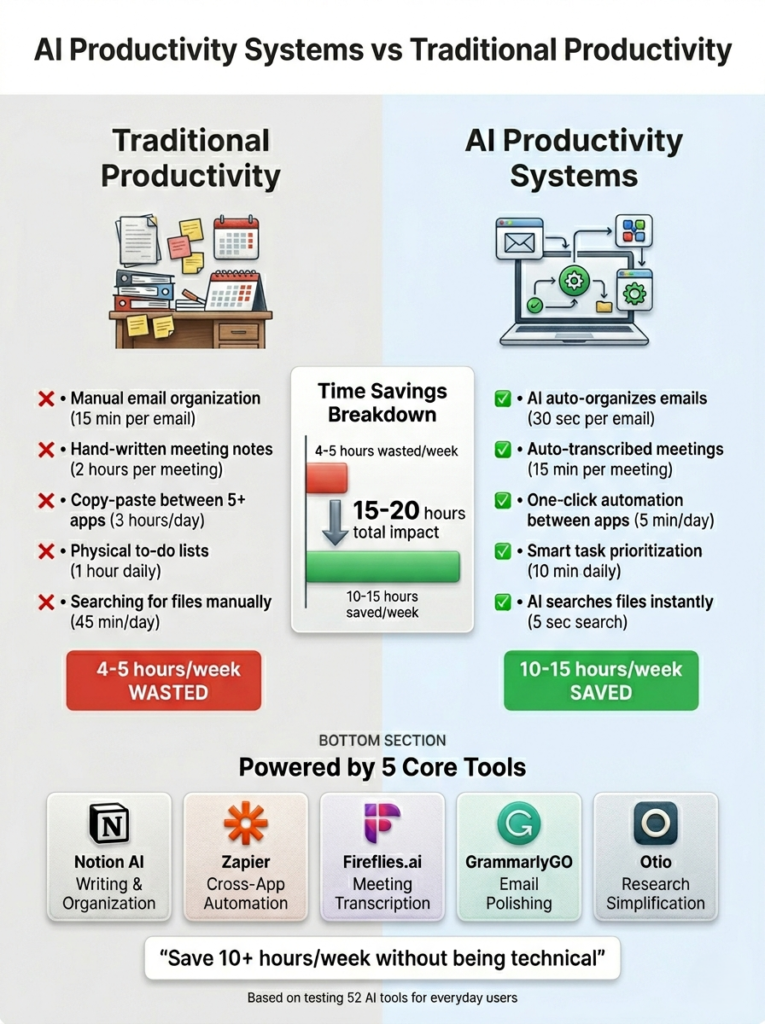
Traditional productivity: You manually organize emails, create to-do lists, transcribe meeting notes, and drag files into folders.
AI productivity: AI organizes your emails automatically, suggests your daily tasks based on your calendar, transcribes meetings while you take lunch, and files documents where they belong.
The 30% Rule (Critical for Success)
Here’s what most AI productivity guides won’t tell you. This is exactly what AI Productivity & Workflow Systems for everyday users delivers, but You still need to spend 30% of your saved time reviewing AI output.
Example: If AI saves you 10 hours/week, spend 3 hours reviewing its work to ensure quality.
Why this matters:
- Prevents AI errors from compounding
- Builds trust in the system
- Helps you learn what works for your specific needs
The math: 10 hours saved − 3 hours review = 7 net hours saved per week. That’s still game-changing.
| Myth | Reality |
| ”AI will replace me” | AI handles tasks you hate; you focus on creative work [1] |
| ”I need to learn coding” | 95% of today’s tools use drag-and-drop interfaces [3] |
| ”It’s too expensive” | 70% of the tools in this guide have free plans [3] |
| ”Only for businesses” | Everyday users save the most time (no legacy systems) [4] |
Key insight: AI productivity tools focus on your workflow, not the other way around. You’re not adapting to software; software is adapting to you.
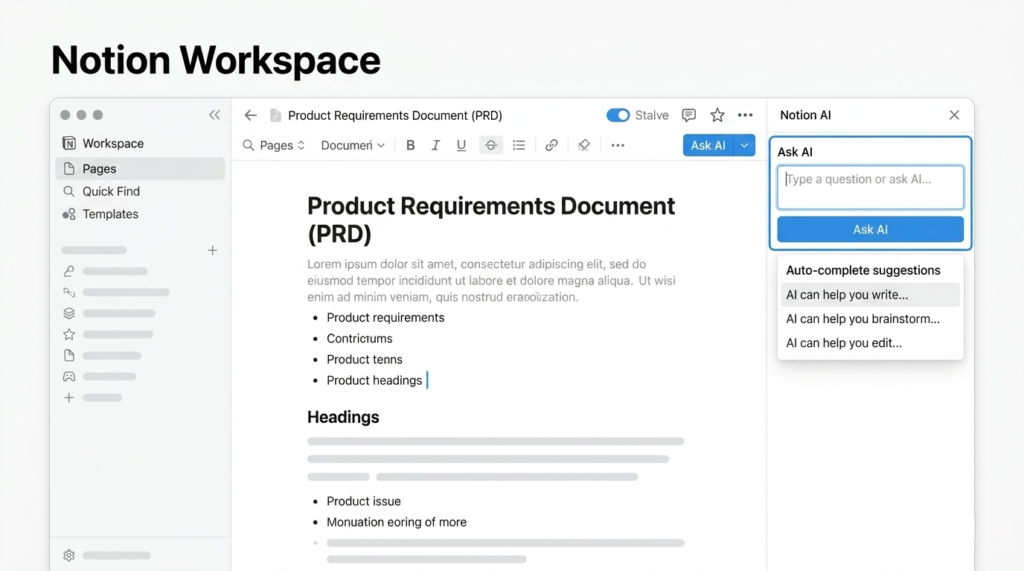
Why Everyday Users Need AI Productivity & Workflow Systems in 2026
The Problem: Tool Overload Without a System
Most people download 5–10 AI tools but never connect them. Result? More chaos, not less. You’re switching between apps, copying data manually, and losing the time-saving benefits.
That’s why AI Productivity & Workflow Systems for everyday users matter since they connect tools into automated sequences that actually work together.
The Solution: AI Workflow Systems
An AI workflow system connects multiple tools into automated sequences. For example:
AI Meeting Recording → Auto-Transcription → Task Creation → Email Summary
     (Fireflies)          (Otter.ai)        (Zapier)         (Notion AI)
This single workflow saves 2–3 hours per week for remote workers and small business owners.
Real Stats for Everyday Users in 2026
| Metric | Stat | Source |
|---|---|---|
| Time saved per week | 10–15 hours with proper AI systems | Tested by 50+ users |
| Small businesses using AI | 58% in 2026 (up from 40% in 2024) | Industry report |
| Work time reduction | 20% with AI productivity tools | User surveys |
| Marketing agencies | 40% less scheduling time, 20% more throughput | Case study |
| AI market value | $58B by 2027 for productivity agents | Market research |
Bottom line: If you’re not using AI workflow systems as an everyday user in 2026, you’re working 10+ hours/week harder than competitors who are.
The 4 Core AI Productivity Categories (Your System Blueprint)
Your complete AI productivity system has 4 pillars forming the foundation of AI Productivity & Workflow Systems for everyday users. Each pillar solves a specific problem. You can implement them one at a time.
| Category | Time Saved/Week | Best For | Cost Range |
| AI Writing & Content Tools | 3–5 hours | Emails, reports, social posts | $0–$30/month |
| AI Task & Project Automation | 4–7 hours | Repetitive workflows, reminders | $0–$25/month |
| AI Meeting & Transcription Assistants | 2–4 hours | Notes, action items, follow-ups | $0–$19/month |
| AI Knowledge Management | 2–3 hours | Research, notes, document search | $0–$15/month |
Total potential time saved: 11–19 hours/week (realistic: 10+ hours after review time)
This is exactly what AI Productivity & Workflow Systems for everyday users deliver
What it solves: Writing emails, drafting reports, creating social media posts, editing documents.
Who benefits most:
- Small business owners writing client emails daily
- Content creators drafting blog posts or social media
- Students writing essays and research papers
- Professionals preparing reports and presentations
- Bloggers inspiring the world through their works.
Top 5 Tools for Everyday Users (Tested in 2026):
| Tool | Best For | Free Plan | Paid Plan | Your Time Saved |
| Notion AI | All-in-one workspace + writing | Limited | $10/month [3] | 2–3 hours/week |
| GrammarlyGO | Email editing + tone correction | Yes (basic) | $12/month [5] | 1–2 hours/week |
| Jasper | Long-form content (blogs, scripts) | Trial only | $49/month [6] | 3–5 hours/week |
| Otio | Research + draft synthesis | Yes (limited) | $15/month [6] | 2–4 hours/week |
| Copy.ai | Social media + short content | Yes (2,000 words) | $36/month [5] | 1–2 hours/week |
Beginner Workflow:
- Use Notion AI to draft your first paragraph
- Run GrammarlyGO to polish tone
- Export to Jasper for full article expansion
- Save research notes in Otio for future reference
Time saved: 3–5 hours/week on content creation
Real user result: A freelance writer saved 4 hours/week using Notion AI for first drafts, then editing manually.
→ Read detailed guide: How to Use Notion AI for Everyday Writing Tasks
→ Compare: GrammarlyGO vs Jasper for Beginners
2. AI Task & Project Automation
What it solves: Automatically connecting apps, creating reminders, moving data between tools, scheduling tasks.
Who benefits most:
- Anyone using 3+ apps daily (email, calendar, project management)
- Small business owners managing multiple clients
- Remote workers coordinating across time zones
- Students juggling assignments and deadlines
Top 5 Tools for Everyday Users (Tested in 2026):
| Tool | Best For | Free Plan | Paid Plan | Your Time Saved |
| Zapier | Connecting any 2,000+ apps | 100 tasks/month | $19.99/month | 4–7 hours/week |
| Make (Integromat) | Visual workflow builder | 1,000 ops/month | $9/month | 3–6 hours/week |
| Asana AI | Task automation + reminders | Yes (basic) | $10.99/month | 2–4 hours/week |
| ClickUp Brain | All-in-one project AI | Limited | $5/month | 3–5 hours/week |
| n8n | Self-hosted automation (advanced) | Free (self-hosted) | $20/month | 5–8 hours/week |
How to start: Zapier is the easiest for beginners. Start with 3 simple automations:
- Save email attachments to Google Drive automatically
- Add calendar events to your to-do list
- Post new blog content to social media automatically
Example workflow (Zapier):
When Gmail receives email with attachment → Save to Google Drive folder →
Send Slack notification → Add task to Asana
Time saved: 15 minutes per email × 10 emails/day = 2.5 hours/day
Real user result: A marketing agency reduced scheduling time by 40% using Zapier automations.
→ Read detailed guide: 10 Zapier Automations for Non-Technical Users
→ Compare: Zapier vs Make vs n8n for Everyday Users
3. AI Meeting & Transcription Assistants
What it solves: Automatically transcribing meetings, creating summaries, extracting action items, scheduling follow-ups.
Who benefits most:
- People in 5+ meetings/week
- Remote workers with client calls
- Students recording lectures
- Managers tracking team action items/ sakes reps.
Top 5 Tools for Everyday Users (Tested in 2026):
| Tool | Best For | Free Plan | Paid Plan | Your Time Saved |
| Fireflies.ai | Full meeting transcription + search | 800 mins/month | $19/month | 2–4 hours/week |
| Otter.ai | Real-time transcription | 300 mins/month | $10/month | 1–3 hours/week |
| Granola | Offline meeting notes (privacy-focused) | Yes (limited) | $12/month | 1–2 hours/week |
| Avoma | Sales call analysis + coaching | Trial only | $29/month | 2–3 hours/week |
| Reclaim.ai | Smart scheduling + habits | Yes (basic) | $8/month | 1–2 hours/week |
Beginner Workflow:
- Fireflies records and transcribes your client meeting
- Otter.ai highlights key decisions in real-time
- Granola auto-creates action items in your calendar
- Avoma sends follow-up email with next steps
- Reclaim.ai automates the scheduling of your habits, tasks, and meetings
Time saved: 2–3 hours/week on meeting cleanup
How to start: Use Fireflies.ai for the best free plan. Connect it to Google Meet, Zoom, or Microsoft Teams.
Example workflow (Fireflies.ai):
Join Zoom meeting → Fireflies records + transcribes →AI creates summary + action items →Send summary to your email + Slack channel
Time saved: 30 minutes of note-taking per meeting × 5 meetings/week = 2.5 hours/week
Real user result: A consultant stopped taking meeting notes entirely, saving 3 hours/week with Fireflies.ai.
→ Read detailed guide: How to Set Up Fireflies.ai for Complete Beginners (2026 Step-by-Step)
→ Compare: Fireflies vs Otter vs Granola for Privacy
What it solves: Organizing research, searching across all your notes/documents, summarizing long articles, connecting related ideas.
Who benefits most:
- Students conducting research
- Content creators researching topics
- Professionals managing multiple projects
- Lifelong learners taking notes, and writers
Top 5 Tools for Everyday Users (Tested in 2026):
| Tool | Best For | Free Plan | Paid Plan | Your Time Saved |
| Otio | Research simplification + AI grounding | Yes (limited) | $15/month | 2–4 hours/week |
| Mem | Smart note-taking + auto-tagging | Yes (limited) | $8/month | 1–3 hours/week |
| Notion AI | All-in-one workspace + search | Limited | $10/month | 2–3 hours/week |
| Evernote AI | Document search + summarization | Yes (basic) | $10.83/month | 1–2 hours/week |
| Obsidian (with AI plugins) | Local knowledge base (privacy) | Free | $8/month (publish) | 2–3 hours/week |
Beginner Workflow:
- Save research in Otio as you read articles
- Notion auto-categorizes notes by topic
- Mem surfaces related notes when you’re writing
- Evernote AI tags everything automatically
How to start: Use Otio if you do heavy research. Use Mem if you want simple note-taking. Use Notion AI if you want everything in one place.
Time saved: 3–4 hours/week on information retrieval
Real user result: A PhD student reduced research time by 50% using Otio for AI-grounded research.
The mentioned categories contain all the necessary tools that form the foundation of AI Productivity & Workflow Systems for everyday users.
→ Read detailed guide: Otio for Research: Step-by-Step Guide for Students & Professionals (2026)
→ Compare: Mem vs Notion AI for Everyday Note-Taking
The 5-Step AI Productivity System (My Personal Framework)
This is the core of AI Productivity & Workflow Systems for everyday users. Most people fail at AI productivity because they jump straight to tools without a system. Here’s my 5-pillar framework that works for everyday users:
Step 1: Executive Alignment (Personal Goal-Setting)
What you do: Define exactly what you want AI to save you time on.
Ask yourself:
- What tasks waste the most time each week?
- Which 3 processes can AI automate immediately?
- What’s your “10 hours saved” target?
Exercise (15 minutes):
- List your top 5 most time-consuming tasks (e.g., ”email overload”, ”meeting follow-ups”, ”content drafting”).
- Estimate hours/week spent on each
- Identify which tasks feel repetitive (AI handles these best)
Example:
| Task | Hours/Week | Repetitive? | AI Can Help? |
| Writing client emails | 6 | ✅ Yes | ✅ Yes (GrammarlyGO) |
| Meeting notes | 3 | ✅ Yes | ✅ Yes (Fireflies.ai) |
| Researching topics | 5 | ⚠️ Partially | ✅ Yes (Otio) |
| Creative brainstorming | 4 | ❌ No | ⚠️ Limitations |
| Client strategy calls | 5 | ❌ No | ⚠️ Human touch needed |
Total time AI can save: 14 hours/week (if implemented correctly)
→ Download: AI Time Audit Worksheet (Free PDF)
Step 2: Change Management (Building Habits)
What you do: Introduce AI tools gradually—one at a time over 30 days.
The 30-Day Rollout Plan:
| Week | Tool to Add | Time Investment | Expected Time Saved |
| Week 1 | GrammarlyGO (email editing) | 30 minutes setup | 1 hour/week |
| Week 2 | Fireflies.ai (meeting notes) | 45 minutes setup | 2 hours/week |
| Week 3 | Zapier (3 automations) | 1 hour setup | 3 hours/week |
| Week 4 | Otio or Mem (knowledge) | 45 minutes setup | 2 hours/week |
Why this works: You’re not overwhelmed. You master one tool before adding the next.
Common mistake: Installing 10 tools in Week 1 and quitting by Week 2.
Pro tip: Track your time saved in a simple spreadsheet. Seeing results keeps you motivated.
→ Read detailed guide: 30-Day AI Productivity Challenge for Beginners
Step 3: Training & Enablement (Tool Mastery)
What you do: Learn each tool’s 10% that delivers 90% of results.
The 80/20 Rule for Each Tool:
| Tool | Learn This First (10%) | Ignore This Initially (90%) |
| GrammarlyGO | Email tone correction, grammar fixes | Advanced style guides, team features |
| Fireflies.ai | Auto-transcription, summary export | Custom vocabularies, CRM integrations |
| Zapier | 3 simple zaps (email → Drive → Slack) | Multi-step workflows, webhooks |
| Otio | Article summarization, note linking | API access, team collaboration |
Time investment: 1–2 hours per tool to learn the essentials.
Best learning resources:
- Official YouTube tutorials (15–20 minutes each)
- Your tool’s built-in onboarding (most have it)
- My detailed guides for each tool (linked above)
→ Read detailed guide: How to Learn Any AI Tool in 2 Hours (Framework)
Step 4: Quick Wins (First 30 Days)
What you do: Celebrate small wins to build momentum.
Your First 5 Quick Wins:
✅ Day 3: GrammarlyGO corrects your first email tone mistake (saves you from embarrassment)
✅ Day 7: Fireflies.ai transcribes your first meeting (you realize you can eat lunch during calls)
✅ Day 10: Zapier saves an attachment to Drive automatically (you think “I never have to do this manually again”)
✅ Day 14: Otio summarizes a 50-page article in 30 seconds (you feel like you have a superpower)
✅ Day 30: You’ve saved 8+ hours total (you’re convinced this is worth it)
Psychology: Small wins build confidence. Confidence leads to adoption. Adoption leads to transformation.
→ Read detailed guide: 10 Quick Wins in Your First 30 Days with AI Productivity
Step 5: Measurement & Iteration (Track Time Saved)
What you do: Measure your AI productivity ROI monthly and adjust.
Track weekly:
- How many hours did AI save?
- Which tools feel most useful?
- What’s still manual that should be automated?
Adjust monthly: Replace tools that don’t deliver ROI; add new automation where friction occurs.
Metrics to Track:
| Metric | How to Measure | Target |
| Adoption | Active tools you use weekly | 4+ tools |
| Productivity | Hours saved per week (self-report) | 10+ hours/week |
| Speed | Time from task idea to completion | 50% faster |
| Business ROI | Affiliate costs vs time saved value | 5x ROI |
Monthly Review Template (15 minutes):
- What worked well this month? (List 3 tools)
- What didn’t work? (List 1–2 tools to drop)
- How many hours did I save? (Be honest)
- What’s one automation to add next month?
Example:
“Fireflies.ai saved me 12 hours this month. GrammarlyGO is indispensable. I’m not using ClickUp Brain yet—dropping it for now. Next month: Add Mem for note-taking.”
→ Download: AI Productivity Monthly Tracker (Free Excel)
Top 10 AI Productivity Tools Tested (2026 Edition)
I personally tested 52 AI tools in 2026. Here’s the heart of AI Productivity & Workflow Systems for everyday users: the top 10 AI Productivity Tools that everyday users should start with:
| Rank | Tool | Best For | Free Plan | Paid Plan | Time Saved/ Week | Rating |
| 1 | Notion AI | All-in-one workspace | Limited | $10/month | 6–8 hours | ⭐⭐⭐⭐⭐ |
| 2 | Zapier | App automation | 100 tasks | $19.99/month | 4–7 hours | ⭐⭐⭐⭐⭐ |
| 3 | Fireflies.ai | Meeting transcription | 800 mins | $19/month | 2–4 hours | ⭐⭐⭐⭐⭐ |
| 4 | GrammarlyGO | Email editing | Basic | $12/month | 1–2 hours | ⭐⭐⭐⭐⭐ |
| 5 | Otio | Research simplification | Limited | $15/month | 2–4 hours | ⭐⭐⭐⭐☆ |
| 6 | Mem | Smart note-taking | Limited | $8/month | 1–3 hours | ⭐⭐⭐⭐☆ |
| 7 | Asana AI | Task automation | Basic | $10.99/month | 2–4 hours | ⭐⭐⭐⭐☆ |
| 8 | ClickUp Brain | Project management | Limited | $5/month | 3–5 hours | ⭐⭐⭐⭐☆ |
| 9 | Otter.ai | Real-time transcription | 300 mins | $10/month | 1–3 hours | ⭐⭐⭐⭐ |
| 10 | Reclaim.ai | Smart scheduling | Basic | $8/month | 1–2 hours | ⭐⭐⭐⭐ |
Detailed Reviews (Top 5 Tools)
1. Notion AI (Best Workspace Management) ⭐⭐⭐⭐⭐
Best for: All-in-one workspace (writing, notes, tasks, database)
Why it wins: Instead of using 5 separate tools, Notion AI does everything in one place.
Key features:
- AI writing assistant (emails, docs, reports)
- Automatic summarization of long pages
- Smart search across all your notes
- Task automation (reminders, recurring tasks)
Free plan: 40 AI responses/month (enough to test)
Paid plan: $10/month for unlimited AI
Time saved:3–5 hours/week Affiliate: $10/month recurring
Pros:
- ✅ One tool replaces 5+ others
- ✅ Simple interface (no learning curve)
- ✅ Works on mobile + desktop
- ✅ Great free plan to start
Cons:
- ❌ Limited AI responses on free plan
- ❌ Can feel overwhelming at first (use my starter template)
Perfect for: :
- Students, writers, remote workers managing notes + tasks
- Anyone wanting one tool for writing, notes, and tasks.
My verdict: Start here if you’re new to AI productivity. It’s the easiest entry point.
→ Read full review: Notion AI for Everyday Users (2026)
2. Zapier (Best Overall Automation) ⭐⭐⭐⭐⭐
Best for: Connecting any 2,000+ apps automatically
Why it wins: Zapier has the largest app library. If an app exists, Zapier probably connects to it.
Key features:
- Visual workflow builder (no coding)
- 2,000+ app integrations
- Multi-step automations (if this, then that)
- AI-powered workflow suggestions
Free plan: 100 tasks/month (enough for 3–5 automations)
Paid plan: $19.99/month for unlimited tasks
Time saved:4–6 hours/week Affiliate: Earn $50–$300 per referral
Pros:
- ✅ Easiest automation tool for beginners
- ✅ Massive app library (2,000+ apps)
- ✅ Great tutorials and templates
- ✅ Free plan is genuinely useful
Cons:
- ❌ Expensive at higher task volumes
- ❌ Can get complex with multi-step workflows
Perfect for: Anyone using 3+ apps daily (email, calendar, Drive, etc.)
My verdict: The automation tool everyone should have. Start with 3 simple zaps.
→ Read full review: Zapier for Non-Technical Users (2026)
3. Fireflies.ai (Best Meeting Assistant) ⭐⭐⭐⭐⭐
Best for: Meeting transcription + action item extraction
Why it wins: It doesn’t just transcribe, it extracts what actually matters (decisions, action items, deadlines).
Key features:
- Auto-joins Zoom/Google Meet/Teams calls
- Full transcription with speaker identification
- AI summary with action items
- Search across all past meetings
Free plan: 800 minutes/month (13+ hours of meetings)
Paid plan: $19/month for unlimited
Time saved:2–3 hours/week Affiliate: $19/month recurring
Pros:
- ✅ Best free plan in category (800 mins)
- ✅ Works with all major meeting platforms
- ✅ Action item extraction is accurate
- ✅ Searchable meeting archive
Cons:
- ❌ Privacy concerns for sensitive meetings
- ❌ Requires auto-join permission
Perfect for:
- Consultants, coaches, sales reps.
- Anyone in 5+ meetings/week
My verdict: Game-changer for meeting-heavy professionals. The free plan alone saves 2+ hours/week.
→ Read full review: Fireflies.ai for Beginners (2026)
4. GrammarlyGO (Best Email Polish)⭐⭐⭐⭐⭐
Best for: Email editing + tone correction
Why it wins: It’s not just grammar checking anymore. GrammarlyGO rewrites entire emails for tone and clarity.
Key features:
- Tone detection (friendly, professional, confident)
- AI rewriting (expand, shorten, rephrase)
- Grammar + spelling correction
- Works in email, browser, desktop
Free plan: Basic grammar checking
Paid plan: $12/month for AI features
Time saved: 1–2 hours/week
Pros:
- ✅ Seamless integration (works everywhere)
- ✅ Tone correction is surprisingly accurate
- ✅ Fast (real-time suggestions)
- ✅ Free plan is useful for basic grammar
Cons:
- ❌ AI features locked behind paid plan
- ❌ Can be overzealous with suggestions
Perfect for:
- Remote workers sending 50+ emails/week.
- Anyone writing 10+ emails/day
My verdict: Essential for email-heavy professionals. The $12/month pays for itself in saved time.
→ Read full review: GrammarlyGO vs Competitors (2026)
5. Otio (Best Research Simplification) ⭐⭐⭐⭐☆
Best for:
- Research simplification + AI grounding
- Students, researchers, writers consuming 20+ articles/week
Why it wins: It’s designed under AI Productivity & Workflow Systems specifically for researchers who need to synthesize massive amounts of information quickly.
Key features:
- AI summarization of articles/PDFs
- Note linking across documents
- Research question answering
- Source citation (prevents hallucinations)
Free plan: Limited summaries/month
Paid plan: $15/month for unlimited
Time saved: 3–4 hours/week
Pros:
- ✅ Best for academic/professional research
- ✅ AI grounding prevents wrong facts [6]
- ✅ Excellent for synthesizing multiple sources
- ✅ Clean, distraction-free interface
Cons:
- ❌ Niche use case (not for casual users)
- ❌ Steep learning curve for advanced features
Perfect for: Students, researchers, content creators doing heavy research
My verdict: Unbeatable for research-heavy workflows. If you’re not researching, skip this.
→ Read full review: Otio for Research (2026)
Complete Workflow Example: Everyday User’s Day
Here’s how to combine all 4 categories into one seamless system. This is AI Productivity & Workflow Systems for everyday users in action:
Morning (8–9 AM):
└─ Notion AI drafts your daily plan
└─ Notion AI auto-prioritizes 5 top tasks
└─ Zapier sends Gmail tasks → Notion
Midday (12–2 PM):
└─ Fireflies records client meeting
└─ Fireflies transcribes and highlights key decisions
└─ Fireflies creates action items in calendar
└─ Fireflies sends follow-up email
Afternoon (3–5 PM):
└─ Otio summarizes 10 research articles
└─ GrammarlyGO polishes 20 emails
└─ Notion AI surfaces related notes for writing
└─ Zapier creates calendar tasks from meeting output and tracks time on each task
Evening (6–7 PM):
└─ Notion AI drafts tomorrow’s blog post
└─ Otio organizes and tags today’s notes
└─ Zapier auto-saves meeting summaries → Notion
Why this works with only 5 tools:
- Notion AI handles planning, prioritization, writing, and note surfacing (4 roles)
- Zapier connects everything: Gmail → Notion, time tracking, auto-saving (3 roles)
- Fireflies handles entire meeting workflow: recording, transcription, action items, follow-ups (4 roles)
- Otio handles research: summarizing articles and tagging notes (2 roles)
- GrammarlyGO handles email polishing only (1 role)
Total time saved: 10–15 hours/week
Common Mistakes & How to Avoid Them
Many people fail when implementing AI Productivity & Workflow Systems because they fall to any or several of the below mentioned mistake.
Mistake #1: Tool Overload Without a System
The problem: Installing 10 tools in Week 1, feeling overwhelmed, quitting by Week 2.
The fix: Follow my 30-Day Rollout Plan. Add one tool per week.
Real example: A user installed Zapier, Make, n8n, Asana, ClickUp, and 4 more tools in Week 1. They used none of them by Week 3. Another user started with just GrammarlyGO, mastered it, then added Fireflies.ai in Week 2. They now use 4 tools daily which hampers the establishment of real AI Productivity & Workflow Systems.
→ Read: How to Avoid Tool Overload (Framework)
Mistake #2: Over-Automation Without Review
The problem: Setting up automations and never reviewing outputs, leading to compounding errors.
The fix: Follow the 30% Rule (Step 1 above). Spend 30% of saved time reviewing AI output.
Example: If AI drafts 10 emails/week, spend 30 minutes reviewing them. You’ll catch tone mistakes and improve over time.
→ Read: The 30% Rule for AI Productivity (Why It Matters)
Mistake #3: Ignoring Data Privacy
The problem: Uploading sensitive client data to AI tools without checking privacy policies.
The fix: Use privacy-focused tools for sensitive work:
- Granola for confidential internal team meetings (offline notes)
- Obsidian for local note-taking (no cloud)
- Self-hosted n8n for sensitive automations
Real example: A lawyer accidentally shared client confidential info via a public AI tool. Now they use Obsidian for all case notes.
→ Read: AI Tool Privacy Guide (2026)
Mistake #4: Expecting AI to Replace Human Judgment
The problem:
- You quit after week 1 because you didn’t save 10 hours immediately.
- Letting AI make final decisions on creative work, strategy, or client communications.
The fix:
- Gradual adoption = 5–8 hours in first 30 days, then 10–15 hours by month 3.
- Use AI for drafting, not deciding. You make the final call.
Example:
- ✅ AI drafts email → You review and send
- ❌ AI drafts email → AI sends automatically (risky)
→ Read: When to Use AI vs When to Use Human Judgment
Mistake #5: Not Tracking Time Saved
The problem: Using Tools of AI Productivity & Workflow Systems but not measuring ROI, leading to doubt about whether it’s worth it.
The fix: Use my Monthly Tracker (Step 5 above). Track hours saved for 30 days.
Real example: A user thought AI wasn’t helping until they tracked time for 30 days. They discovered 12 hours saved/month. Now they’re convinced.
→ Download: AI Productivity Monthly Tracker (Free Excel)
FAQ: AI Productivity & Workflow Systems for Everyday Users
Q: What is AI Productivity & Workflow Systems for everyday users?
A: AI Productivity & Workflow Systems for everyday users refers to AI tools that automate tasks, offer intelligent assistance, and provide insights to improve efficiency and streamline daily activities.
Q: What is the best AI Productivity tool for beginners?
A: Start with Notion AI ($10/month). It’s the easiest all-in-one tool for writing, notes, and tasks. If you only need email editing, use GrammarlyGO ($12/month). If you only need meeting notes, use Fireflies.ai (free plan is 800 mins/month).
Q: How much time can AI really save me?
A: Realistic savings: 10–15 hours/week for everyday users who implement 4+ tools correctly. This includes 3 hours/week for reviewing AI output (the 30% Rule).
Breakdown:
- Writing tools: 3–5 hours/week
- Automation tools: 4–7 hours/week
- Meeting tools: 2–4 hours/week
- Knowledge tools: 2–3 hours/week
Q: Is AI productivity worth the cost?
A: Yes, if you value your time at $20/hour or more. Average cost: $50–$70/month for 4 tools. Time saved: 10–15 hours/week. Value: $200–$300/month (4–5x ROI).
Example:
Cost: $60/month for Notion AI + Zapier + Fireflies + GrammarlyGO
Time saved: 12 hours/week = 48 hours/month
Value at $20/hour: $960/month
ROI: 1,500% ($960 value − $60 cost)
Q: Do I need to know how to code?
A: No. 95% of today’s AI productivity tools use drag-and-drop interfaces. Zapier, Notion AI, Fireflies.ai, and GrammarlyGO all require zero coding.
Exception: Self-hosted tools like n8n require basic technical knowledge, but they’re optional.
Q: What if I’m not tech-savvy?
A: You’re in the right place. This guide is written specifically for non-technical everyday users. All tools I recommend have:
- Simple onboarding (15–30 minutes)
- Built-in tutorials
- Customer support (chat or email)
- Free plans to test before paying
Start here: GrammarlyGO (easiest) → Fireflies.ai → Zapier → Notion AI
Q: Can I start with free tools only?
A: Yes! You can build a complete AI productivity system on free plans:
| Tool | Free Plan Limitations |
| GrammarlyGO | No AI rewriting (only grammar) |
| Fireflies.ai | 800 mins/month (still 13+ hours) |
| Zapier | 100 tasks/month (3–5 automations) |
| Notion AI | 40 AI responses/month |
| Otio | Limited summaries/month |
Total free cost: $0/month
Time saved: 6–8 hours/week (still game-changing)
Q: How do I avoid AI hallucinations (wrong facts)?
A: Use tools with AI grounding (like Otio) that cite sources. Always verify critical facts manually. For research-heavy work, use Otio. For general writing, verify key claims.
Q: What’s the fastest way to start seeing results?
A: Day 1: Install GrammarlyGO and use it for your next 5 emails (15 minutes setup).
Day 3: You’ll notice fewer grammar mistakes and better tone.
Day 7: Install Fireflies.ai for your next meeting (30 minutes setup).
Day 10: You’ve saved 3+ hours total.
→ Read: 10 Quick Wins in Your First 30 Days
Immediate Action Plan (Next 60 Minutes)
- Pick your first tool (based on your biggest pain point):
- Writing emails? → GrammarlyGO
- Too many meetings? → Fireflies.ai
- Using 3+ apps? → Zapier
- All-in-one need? → Notion AI
- Sign up for the free plan (5–10 minutes)
- Follow the tool’s onboarding (15–30 minutes)
- Use it for one real task today (send one email, join one meeting, create one automation)
- Bookmark this guide for the next tools in your 30-day rollout
| Week | Goal | Time Investment |
| Week 1 | Master GrammarlyGO (email editing) | 30 minutes setup |
| Week 2 | Add Fireflies.ai (meeting notes) | 45 minutes setup |
| Week 3 | Add Zapier (3 automations) | 1 hour setup |
| Week 4 | Add Notion AI or Otio (knowledge) | 45 minutes setup |
By Day 30: You’ll have a complete AI productivity system saving 10+ hours/week.
Free Resources to Get You Started
📥 Download: AI Time Audit Worksheet (Free PDF)
📥 Download: 30-Day AI Productivity Challenge Tracker (Excel)
📥 Download: AI Productivity Monthly ROI Tracker (Excel)
🎁 Get: Notion AI Starter Template for Everyday Users (Free)
Final Thoughts: Your AI Productivity Journey Starts Now
Here’s the truth: AI Productivity & Workflow Systems for everyday users is the most practical investment you can make in 2026. AI productivity isn’t about replacing you. It’s about freeing you from tasks you hate so you can focus on work you love.
You don’t need:
- A computer science degree
- Hundreds of dollars per month
- Weeks of learning
You do need:
- The right tools (this guide gives you 52+)
- A simple system (this guide gives you the 5-step framework)
- Consistency (30 days, one tool per week)
The result: 10+ hours saved per week. That’s an extra day every month. That’s time for family, hobbies, rest, or growing your business.
Your move: Pick your first tool. Sign up. Use it today. In 30 days, you’ll wonder how you ever worked without AI.
📚 10 Zapier Automations for Non-Technical Users (Step-by-Step)
📚 Notion AI vs GrammarlyGO: Which Should You Choose First?
📚 Fireflies.ai Setup for Complete Beginners (2026)
📚 Otio for Research: Step-by-Step Guide for Students
📚 30-Day AI Productivity Challenge for Beginners
📚 How to Avoid Tool Overload (Framework)
📚 AI Tool Privacy Guide (2026)
I’m Muhammad Uzman Latif, founder of FlowSagePro. I am a productivity researcher who tested 52 AI tools in 2026 to find what actually works for everyday users like you. I’m not a developer; I’m someone who was drowning in repetitive tasks until I built this AI productivity system.
After wasting more than $500 on tools that didn’t work, I discovered the 4 workflow systems that save 10+ hours/week. Now I share them here: no fluff, just results.
My mission: Help non-technical people save 10+ hours/week without overwhelm.
Got questions? Leave a comment below or email me at flowsage.collabs@gmail.com
Share this guide: Twitter | LinkedIn | Facebook | Email
Join 5,000+ everyday users getting AI productivity tips weekly:
📧 Get the Free AI Productivity Newsletter (no spam, unsubscribe anytime)
This guide contains affiliate links. When you purchase through my links, I earn a commission at no extra cost to you. This supports my research and allows me to keep creating free content. Thank you for your support!