
The Automation Trap That’s Wasting Your Hours
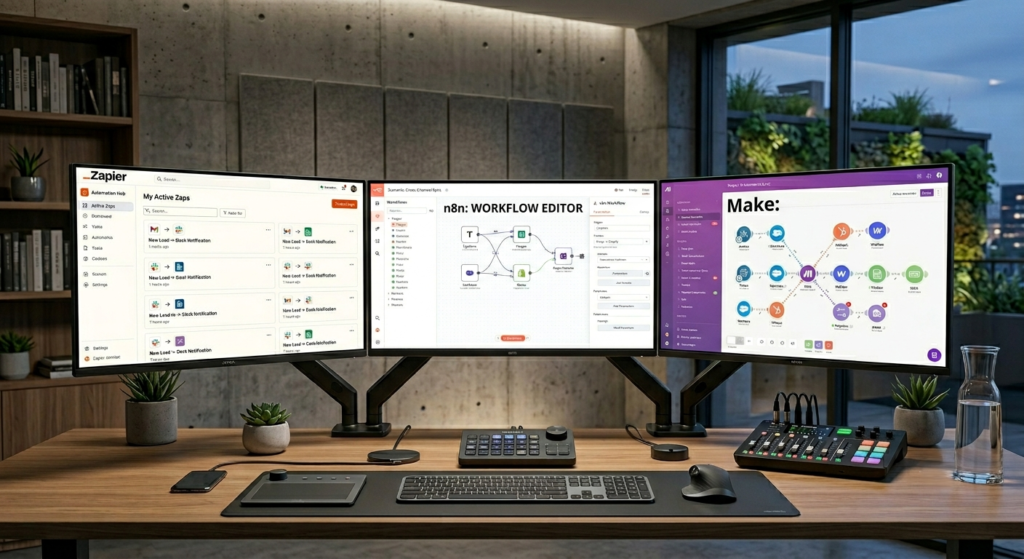
If you’re researching Zapier vs Make vs n8n, you’ve probably heard automation will “save you 10 hours a week.” But you’re staring at three confusing options: Zapier, Make, and n8n wondering in this Zapier vs Make vs n8n comparison which one won’t become another tool you abandon after two weeks.
Here’s the frustration: Zapier feels easiest but gets expensive fast. Make looks powerful but overwhelms beginners. n8n is cheap but screams “developer tool.”
You just want to automate sending meeting notes to Notion without becoming an automation engineer. Notion remains one of the most popular productivity hubs for automated note management and team collaboration.
If you’re still building your overall AI productivity setup, read our complete guide to smarter AI workflows and productivity systems.
Problem Breakdown: Why Most People Choose Wrong
Three reasons everyday users pick the wrong automation platform:
| Mistake | Why It Happens |
| Chasing “most powerful” | Powerful ≠ usable for your actual needs |
| Ignoring pricing tiers | Free tier fools you; costs explode at 500 tasks |
| Overestimating technical skills | You don’t need JSON expertise for basic automations |
The reality? The best tool is the one you’ll actually use consistently. The biggest mistake in the Zapier vs Make vs n8n debate is assuming the most powerful platform is automatically the best choice for everyday users. This is exactly why human judgment still matters even when AI tools and automation platforms become more powerful.
Core Comparison: Zapier vs Make vs n8n Head-to-Head
This Zapier vs Make vs n8n comparison focuses specifically on everyday productivity users rather than developers or enterprise automation teams.
Choose Zapier if:
- You’re non-technical and want it working in 15 minutes
- Your budget is $20–50/month
- You need reliability over customization
Choose Make if:
- You’re comfortable with visual logic builders
- You need complex multi-step workflows
- You want better pricing than Zapier at scale
Choose n8n if:
- You’re tech-savvy or willing to learn
- You want self-hosting to avoid per-task pricing
- You need unlimited executions on a fixed budget
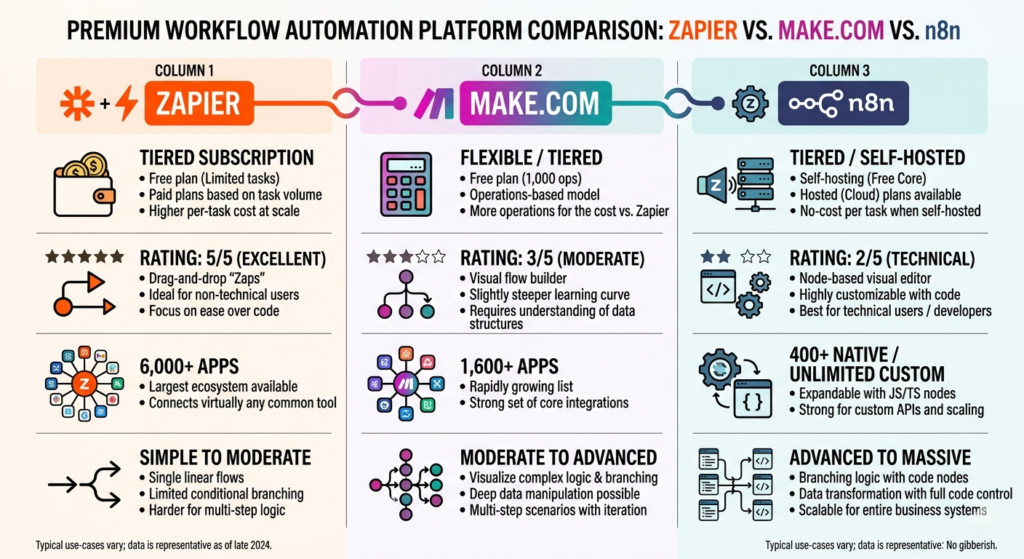
| Feature | Zapier | Make (Integromat) | n8n |
| Ease of Use | ⭐⭐⭐⭐⭐ (Easiest) | ⭐⭐⭐ (Moderate) | ⭐⭐ (Steep learning) |
| Free Tier | 100 tasks/month | 1,000 ops/month | Unlimited (self-hosted) |
| Starting Paid Plan | $19.99/mo | $9/mo | $20/mo (cloud) or free (self-hosted) |
| Task Limit on Basic Plan | 750 tasks/mo | 10,000 ops/mo | Unlimited executions |
| Integrations | 6,000+ apps | 2,000+ apps | 400+ apps (growing) |
| Visual Builder | Linear zaps | Visual scenario map | Node-based workflow |
| Best For | Beginners, quick wins | Complex workflows, cost-conscious | Tech users, high-volume |
| 2026 Verdict | Best for simplicity | Best value for complexity | Best for power users |
Deep Dive: How Each Platform Actually Works
Zapier: The “Set It and Forget It” Option
In the Zapier vs Make vs n8n comparison, Zapier consistently wins for simplicity and beginner-friendly setup speed.
How it works: Trigger → Action (linear, one-to-one or one-to-many)
Real example: When Gmail receives email with attachment → Save to Google Drive → Send Slack notification
What you get:
- Pre-built templates for 80% of common use cases (You can browse Zapier’s official automation templates library to find ready-made workflows for common apps and tasks.)
- No learning curve—drag, drop, done
- Rock-solid reliability (99.99% uptime)
Where it hurts:
- Task limits count every step as 1 task
- Multi-step zaps eat your quota fast
- $49/mo plan only gives you 2,000 tasks
Beginners can also follow our full Zapier setup walkthrough designed specifically for non-technical users.
Make: The Visual Powerhouse
Many users researching Zapier vs Make vs n8n eventually choose Make because it balances affordability with advanced workflow flexibility.
How it works: Visual scenario map with branching logic, filters, and data transformation
Real example: When Google Form submitted → Parse data → If value > $100, send Slack alert + create Trello card + email confirmation
What you get:
- Operations are cheaper (10,000 ops = roughly 750 Zapier tasks)
- Visual logic shows entire workflow at once
- Advanced data manipulation without code
Make also provides an extensive integrations marketplace for advanced automation scenarios.
Where it hurts:
- Learning curve: 2–4 hours to feel comfortable
- Complex scenarios can become “spaghetti” without discipline
- Smaller app library than Zapier
Learn more about Zapier’s official automation templates and integrations on the official Zapier website.
n8n: The Self-Hosted Wildcard
In the Zapier vs Make vs n8n ecosystem, n8n appeals most to technical users wanting maximum customization and lower long-term costs.
How it works: Node-based workflow editor (can self-host or use cloud)
Real example: Webhook receives form data → Transform JSON → Query database → Conditional routing → Multiple API calls → Store results
What you get:
- Unlimited executions if self-hosted (one-time server cost ~$5/mo)
- Full control over data (important for privacy)
- Custom nodes you can build yourself
Advanced users can explore n8n’s official documentation for self-hosting and custom workflow deployment.
Where it hurts:
- Requires technical setup (Docker, Node.js, or cloud deployment)
- Fewer pre-built integrations
- You’re responsible for maintenance and updates
Step-by-Step: How to Pick in 30 Minutes
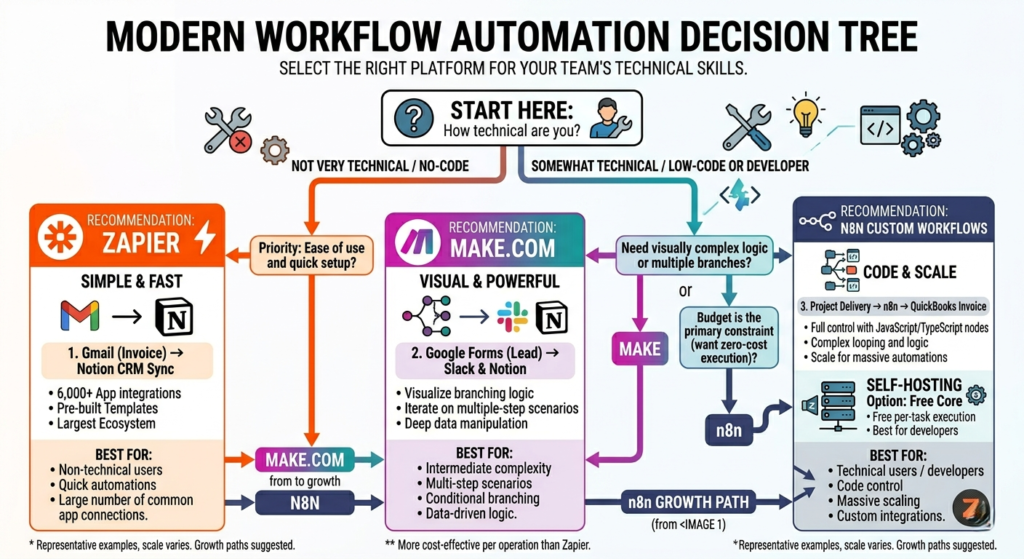
Instead of endlessly researching Zapier vs Make vs n8n reviews, use this quick framework to identify which tool actually matches your workflow needs.
Step 1: List Your Top 3 Automations
Write down exactly what you want to automate:
1. Save email attachments to Google Drive
2. Post Instagram photos to Twitter automatically
3. When meeting ends, send summary to Notion
Step 2: Match to Tool Strengths
| Automation Complexity | Recommended Tool |
| Simple (1–3 steps) | Zapier |
| Medium (4–8 steps, logic) | Make |
| Complex (APIs, custom code) | n8n |
Step 3: Calculate Real Cost for Your Usage
Zapier cost formula:
- Basic automations (~100 tasks/month): Free tier works
- Medium usage (~500 tasks/month): $19.99/mo Starter
- Heavy usage (~2,000 tasks/month): $49/mo Professional
Make cost formula:
- Lightweight (1,000 ops/month): Free tier
- Medium (10,000 ops/month): $9/mo Maker
- Heavy (50,000 ops/month): $16/mo Pro
n8n cost formula:
- Self-hosted: ~$5/mo server (unlimited)
- Cloud: $20/mo Starter (unlimited executions)
Step 4: Test the Free Tier First
Don’t commit yet. Spend 30 minutes building ONE automation on each platform’s free tier:
- Zapier: Build “Gmail → Google Drive” automation
- Make: Build same workflow as scenario
- n8n: If comfortable, deploy locally and test
Which felt most natural? That’s your winner. If you constantly jump between productivity apps, this guide on avoiding tool overload will help you simplify your workflow stack.

Real-World Use Case: Freelancer Automating Client Work
User: Sarah, freelance graphic designer, 15–20 clients/month.
Her experience reflects why the Zapier vs Make vs n8n decision often depends more on usability than raw technical power.
Her automations:
- New client email → Create Notion client page + Google Drive folder
- Invoice paid → Send thank-you email + schedule follow-up
- Project completed → Request testimonial + add to portfolio tracker
What she chose: Zapier Professional ($49/mo)
Why:
- Built all 3 automations in 45 minutes total
- Never worried about breaking workflows
- 2,000 tasks/month covers her volume perfectly
- Time saved: ~6 hours/month (worth $180 at her $30/hr rate)
Her takeaway: “I tried Make to save money, but spent 3 hours troubleshooting. Zapier paid for itself in one day.”
Common Mistakes + Fixes
Mistake 1: Building Too Complex Automations Too Soon
Problem: Your first Zap has 12 steps and 4 filters. When it breaks, you’re lost.
Fix: Start with 2–3 step automations. Chain them together later.
Example progression:
Week 1: Email → Save attachment
Week 2: Email → Save attachment + Slack notification
Week 3: Email → Save attachment + Slack + Create Notion page
Mistake 2: Ignoring Error Handling
Problem: Automation fails silently. You never know it broke until clients complain.
Fix: Add error notifications to every critical workflow.
Zapier example: Add “Path” step → If error occurs → Send yourself email alert
Mistake 3: Not Tracking Task Usage
Problem: Mid-month you hit your task limit. Automations stop working.
Fix: Check usage dashboard weekly. Set up usage alert at 80%.
Pro tip: Zapier shows usage in real-time. Make shows it at scenario level. n8n cloud shows it in dashboard.
Optimization Tips for 2026
No matter where you land in the Zapier vs Make vs n8n comparison, optimization matters more than simply choosing the “most powerful” platform.
1. Use Zapier’s “Multi-Step Zaps” Wisely
Every action in a multi-step zap counts as 1 task. Minimize steps by:
- Combining actions where possible (e.g., “Create Google Sheet row + Send email” = 2 tasks instead of 2 separate zaps = 4 tasks)
- Using filters to prevent unnecessary executions
2. Leverage Make’s Data Storing
Make lets you store data between scenarios. Use this for:
- Maintaining state across workflows
- Reducing API calls (cache data locally)
- Building more complex logic without external databases
3. n8n Self-Hosting Cost Breakdown
For serious automation users, self-hosting n8n on DigitalOcean ($5/mo droplet) or Railway ($5/mo) gives you:
- Unlimited executions
- Full data control
- Custom integrations
Total cost: $5/mo vs. Zapier’s $49/mo for similar volume
Many users deploy n8n on affordable cloud providers like DigitalOcean for low-cost unlimited automation. Others prefer Railway because of its beginner-friendly deployment experience.
4. Hybrid Approach: Use Multiple Tools
Don’t force one tool to do everything:
- Zapier for simple, critical automations (email, calendar, CRM)
- Make for complex data processing (spreadsheets, reports)
- n8n for custom API work and high-volume tasks
Internal Linking: FlowSage Ecosystem
Want to see how automation fits into your larger productivity system? Check out:
- AI Productivity & Workflow Systems for Everyday Users: The Complete 2026 Guide — Our pillar guide covering the full ecosystem
- How to Avoid Tool Overload — Framework for choosing the right number of tools
- **[Zapier for Non-Technical Users **(2026) — Deep dive review with step-by-step setup guide
Frequently Asked Questions
Is Zapier better than Make for beginners?
Yes. Zapier is generally easier to learn and faster to set up, making it the better choice for most non-technical users.
Is Make cheaper than Zapier?
In most cases, yes. Make provides significantly more operations at lower pricing tiers, making it attractive for users running larger workflows.
Is n8n really free?
The self-hosted version of n8n can be run at very low cost on your own server, making it one of the most affordable automation platforms for advanced users.
Which automation platform is best in 2026?
For most everyday users, Zapier remains the easiest option. Make offers the best balance of power and cost, while n8n is ideal for users wanting maximum flexibility and control.
Conclusion: Your Automation Journey Starts Here
After comparing Zapier vs Make vs n8n, the truth is that you don’t need the “best” automation tool. You need the one that actually works for your specific use case and stays out of your way.
The verdict for everyday users in 2026:
- Most people: Start with Zapier. It just works. If you’re serious about long-term productivity, our complete AI workflow systems guide explains how automation tools fit into a larger productivity ecosystem.
- Budget-conscious: Try Make if you’re comfortable with a learning curve
- Tech-savvy: n8n self-hosted gives the best value at scale
Your next step: Pick ONE automation you’ve been putting off. Build it this week on Zapier’s free tier. Once you see 15 minutes of work saving you 30 minutes weekly, you’ll understand why automation is non-negotiable in 2026.
Whether you’re evaluating Zapier vs Make vs n8n for freelancing, content creation, productivity, or small business workflows, consistency matters more than advanced features you’ll never use.
The tools are ready. Your time is worth more than ever. Stop doing repetitive work manually.