


Productivity stops feeling chaotic when systems replace guesswork.
Most people approach AI the wrong way.
They jump between apps, test random prompts, install five different tools, and spend hours watching tutorials instead of improving actual work.
The result?
More complexity.
More digital clutter.
More unfinished workflows.
That is why many people fail to see meaningful AI Workflow Upgrades even after trying powerful tools.
The problem is not the technology.
The problem is the absence of a practical system.
Most successful AI Workflow Upgrades begin with simplifying one recurring task before expanding into larger operational systems.
Real productivity growth happens when AI becomes part of a structured workflow instead of another distracting app competing for attention.
A simple workflow that saves 15 minutes every day is more valuable than an advanced automation you never consistently use.
The goal is not to build a futuristic productivity machine overnight.
The goal is to create repeatable systems that reduce friction, improve execution speed, and simplify daily operations.
The best AI Workflow Upgrades are usually small improvements that quietly remove unnecessary friction from everyday work.
This guide explores 10 practical AI productivity systems that help everyday users work faster, organize better, and execute more consistently without building complicated setups or relying on technical skills.
Why Most AI Productivity Systems Fail
Most beginners assume productivity improves automatically after installing AI tools.
In reality, tools without structure often create more friction.
People experiment randomly instead of building operational systems around specific tasks.
Common workflow problems include:
- Too many disconnected apps
- Constant context switching
- No centralized information system
- Poor workflow visibility
- No repeatable execution process
The issue is rarely a lack of capability.
The issue is fragmented productivity architecture.
For example, someone might use ChatGPT for writing, Google Docs for notes, Trello for tasks, and random bookmarks for research. Individually, these tools are useful. Together, they create scattered workflows that slow execution.
Effective AI Workflow Upgrades reduce fragmentation by centralizing information, automation, and execution into connected workflows.
That is why centralized AI workflows are becoming increasingly important for students, freelancers, creators, and small businesses.
Instead of constantly searching for information, modern systems bring information into one organized environment.

The Shift from AI Tools to AI Productivity Systems
The biggest productivity improvement in 2026 is not better prompts.
It is better systems. That is why AI Workflow Upgrades are becoming more valuable than simply collecting new tools.
AI tools are evolving from standalone assistants into connected workflow ecosystems that support:
- task management
- research organization
- writing workflows
- automation
- execution planning
- knowledge retrieval
Many of these operational concepts are explored further inside this complete AI productivity workflow guide for everyday users.
According to Microsoft’s Work Trend Index, AI adoption is increasingly focused on workflow integration rather than isolated experimentation.
This shift matters because disconnected productivity creates mental fatigue.
Every time users switch between tabs, apps, or task systems, cognitive energy drops.
Practical AI productivity systems reduce those interruptions by centralizing work.
Instead of opening five apps to complete one task, users operate from a structured command center.
That is why platforms like Notion AI, ChatGPT, and automation systems are becoming foundational productivity infrastructure instead of optional tools.
The future of productivity belongs to workflow ecosystems, not isolated apps.
The 4-Layer AI Productivity Framework
The most effective systems usually follow four operational layers.
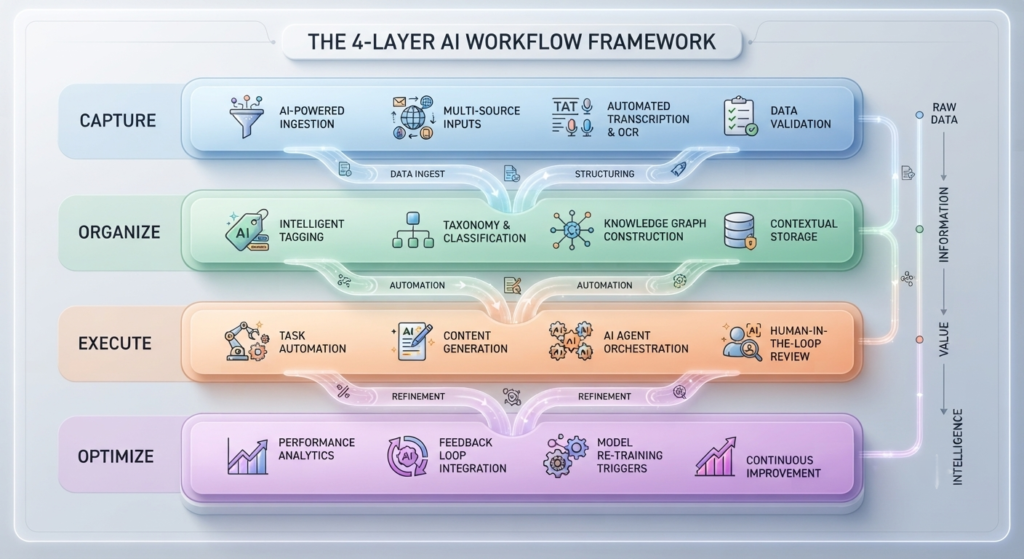
Layer 1: Capture
This layer focuses on collecting information quickly.
Examples include:
- voice notes
- quick ideas
- research snippets
- meeting notes
- saved links
The goal is simple:
capture information before it disappears.
Layer 2: Organize
Once information enters the system, AI helps categorize and structure it automatically.
This includes:
- tagging
- summarization
- note organization
- task extraction
- project grouping
Without organization, captured information becomes digital clutter.
Layer 3: Execute
This is where productivity systems generate measurable gains.
Execution systems help users:
- write faster
- prioritize tasks
- automate repetitive actions
- generate outlines
- draft emails
- schedule workflows
Execution speed improves dramatically when friction decreases. This is where practical AI Workflow Upgrades create measurable operational improvements.
Layer 4: Optimize
The final layer focuses on improvement.
This includes:
- reviewing workflows
- identifying bottlenecks
- measuring time saved
- simplifying recurring tasks
- improving templates
Most people stop after setup.
High-performing users continuously optimize systems.
10 Practical AI Productivity Systems for Faster Work
1. Centralized Knowledge Management System
One of the biggest workflow upgrades is creating a centralized information hub.
Instead of scattered notes across apps, AI-powered systems organize:
- ideas
- research
- tasks
- meeting summaries
- project updates
Tools like Notion AI excel here because they combine search, summarization, and organization inside one workspace.
This reduces retrieval time significantly.
Instead of remembering where information exists, the system surfaces it automatically. Centralized information hubs are among the most effective AI Workflow Upgrades for everyday users.
2. AI Email Workflow System
Email consumes enormous cognitive energy.
A structured AI workflow can reduce that load dramatically.

Use AI to:
- draft responses
- summarize long threads
- rewrite tone
- generate follow-ups
- create reusable templates
Instead of manually rewriting similar emails repeatedly, templates and AI prompts standardize communication.
Small workflow improvements like this compound quickly over time.
Email optimization remains one of the fastest AI Workflow Upgrades for improving execution speed.
3. AI Research Organization Pipeline
Research becomes inefficient when tabs remain open for days.
Structured AI research systems solve this problem.

Use tools like:
- Perplexity
- Feedly
- Notion AI
to:
- summarize sources
- organize findings
- extract key insights
- build searchable research databases
This turns random browsing into structured knowledge management.
Research systems improve both speed and clarity.
4. Automated Meeting Documentation System
Meetings create hidden productivity costs.
Without systems, notes disappear and action items become unclear.
AI tools like Otter.ai and Fireflies.ai automate:
- transcription
- summaries
- action-item extraction
- searchable meeting archives
This removes manual note-taking friction and improves execution afterward.
5. AI Content Production Workflow
Content creation becomes faster when workflows are systemized.
Instead of starting from blank pages repeatedly, AI productivity systems help users:
- generate outlines
- repurpose ideas
- structure drafts
- optimize readability
- build publishing pipelines
This is especially valuable for bloggers and creators managing consistent output schedules.
The strongest productivity systems reduce creative friction without removing human thinking.
6. Template-Based Workflow Architecture

Templates are one of the most underrated productivity accelerators.
Reusable systems reduce decision fatigue dramatically.
Create templates for:
- client onboarding
- blog outlines
- research collection
- meeting agendas
- email responses
- project planning
Templates create operational consistency across recurring tasks.
That consistency improves execution speed over time.
7. AI Task Prioritization System
Many people stay busy without working strategically.
AI systems can help prioritize:
- deadlines
- importance
- urgency
- workload distribution
This creates clearer execution pathways.
Instead of reacting emotionally to tasks, structured systems guide focus logically.
8. Workflow Automation for Repetitive Tasks
Automation should remove friction, not create complexity.
Start small.
Good beginner automations include:
- saving attachments automatically
- syncing tasks between apps
- creating reminders
- updating spreadsheets
- moving files into folders
Platforms like Zapier help automate repetitive operational tasks without requiring advanced technical skills.
Users exploring workflow scaling should also study choosing the right automation tool before building larger systems.
Simple automations usually outperform overly complicated setups. Beginners building automation systems should spend time choosing the right automation tool before scaling larger workflows. Sustainable AI Workflow Upgrades focus on removing friction instead of creating technical complexity.
9. AI Writing Optimization System
Writing quality improves faster when AI becomes part of the editing process.
AI systems help optimize:
- tone
- grammar
- structure
- readability
- clarity
Writers still control ideas and direction.
The AI improves refinement speed. Strong workflows still depend on smarter human decision-making systems rather than blind automation.
This creates faster publishing workflows without sacrificing quality.
10. Weekly Productivity Optimization Review
Even the best systems decay without review.
A weekly optimization session helps users:
- identify bottlenecks
- remove unnecessary steps
- improve templates
- simplify workflows
- measure efficiency gains
High-performing productivity systems evolve continuously.
Optimization is not a one-time setup process.
It is ongoing operational maintenance.
Common Mistakes That Damage AI Productivity Systems
Using Too Many Tools
More tools rarely mean better productivity.
Fragmented systems increase mental switching costs.
Overengineering Workflows
Complex systems often fail because they require too much maintenance.
Simple workflows survive longer.
Ignoring System Visibility
Hidden systems are forgotten systems.
Your workflows should remain easy to access and easy to use.
Automating Before Understanding the Process
Never automate chaos.
First understand the workflow manually.
Then optimize it gradually.
How to Build a Sustainable AI Productivity Stack
The strongest productivity stacks usually combine:
- one AI assistant
- one organizational workspace
- one automation platform
- one communication system
That is enough for most users. Most successful AI Workflow Upgrades rely on operational simplicity rather than excessive automation layers.
For example:
- ChatGPT for thinking and drafting
- Notion AI for organization
- Zapier for automation
- Google Workspace for communication
This creates a connected operational ecosystem instead of isolated productivity islands.
Users scaling larger systems should first understand the risks of avoiding AI tool overload before expanding their workflow stack further.
Users trying to scale workflows further should focus on avoiding AI tool overload before expanding into larger automation systems.
Real Example of a Simple Productivity System
A freelance writer struggles with:
- scattered research
- inconsistent content planning
- missed deadlines
- repetitive email writing
Instead of adopting ten new tools, they build a simple workflow:
- Notion AI organizes content ideas
- ChatGPT helps generate outlines
- Zapier automates task reminders
- reusable templates streamline client communication
Within weeks:
- execution becomes faster
- content production becomes smoother
- mental clutter decreases significantly
The improvement comes from workflow structure, not from AI hype.

Final Thoughts
AI productivity systems are not about replacing human effort.
They are about reducing friction.
The most effective AI Workflow Upgrades quietly improve execution without making workflows harder to manage.
The best systems are usually simple, visible, repeatable, and easy to maintain.
You do not need complicated automation architecture to work faster.
You need structured workflows that remove unnecessary effort from recurring tasks.
Small operational upgrades compound over time.
That is how sustainable productivity systems are built.