
Artificial intelligence tools are now deeply embedded into everyday productivity.
People use AI to summarize meetings, organize research, write emails, automate tasks, analyze spreadsheets, manage calendars, and even handle client communication.
But there’s a growing problem nobody talks about enough:
Most users have no idea where their data goes after they paste it into an AI tool.
That’s exactly why this AI Tool Privacy Guide 2026 matters.
Many everyday users unknowingly upload sensitive information into AI systems every single day:
- Client contracts
- Financial reports
- Personal notes
- Meeting recordings
- Password hints
- Internal company documents
- Medical or educational records
The productivity gains are real.
But so are the risks.

Recent 2026 research shows growing concerns around AI surveillance, hidden data collection, AI-powered monitoring, and “shadow AI” inside organizations where employees use unapproved tools without understanding privacy consequences.
The good news?
You do not need to stop using AI tools.
You simply need smarter systems.
This AI Tool Privacy Guide 2026 will show you exactly how to use modern AI productivity tools safely without becoming paranoid or sacrificing efficiency. If you want the broader system behind these workflows, read our complete AI workflow guide.
Why AI Tool Privacy Guide 2026 Matters More Than Ever
The biggest shift in 2026 is not AI capability.
It is AI integration.
AI is now connected to:
- Email inboxes
- Browsers
- Cloud drives
- Calendars
- Team chats
- Notes apps
- CRMs
- Meeting tools
- Coding environments
Once AI tools gain access to connected systems, the privacy conversation changes completely.
Many tools now operate beyond simple prompts.
They can access workflows, history, documents, and behavioral patterns.
Security experts increasingly warn that AI boundaries matter more than prompts themselves.
At the same time, studies show many AI-powered browser extensions collect user data extensively.
That creates a dangerous gap:
Users adopt AI faster than they understand AI privacy.
This AI Tool Privacy Guide 2026 exists to close that gap.
AI Tool Privacy Guide 2026: The 5 Biggest Privacy Risks
1. Copy-Pasting Sensitive Information into AI Tools
This is the most common mistake.
Users paste:
- Client proposals
- Legal agreements
- Internal reports
- Student data
- Financial spreadsheets
without checking whether the tool stores prompts or uses them for model improvement.
This becomes especially risky inside free AI tools.
Safer Alternative
Before uploading anything sensitive:
- Remove names
- Remove account numbers
- Replace identifiers with placeholders
- Use summaries instead of raw documents
Example:
Instead of:
“Analyze this contract from John Smith at ABC Company.”
Use:
“Analyze this service agreement between a client and vendor.”
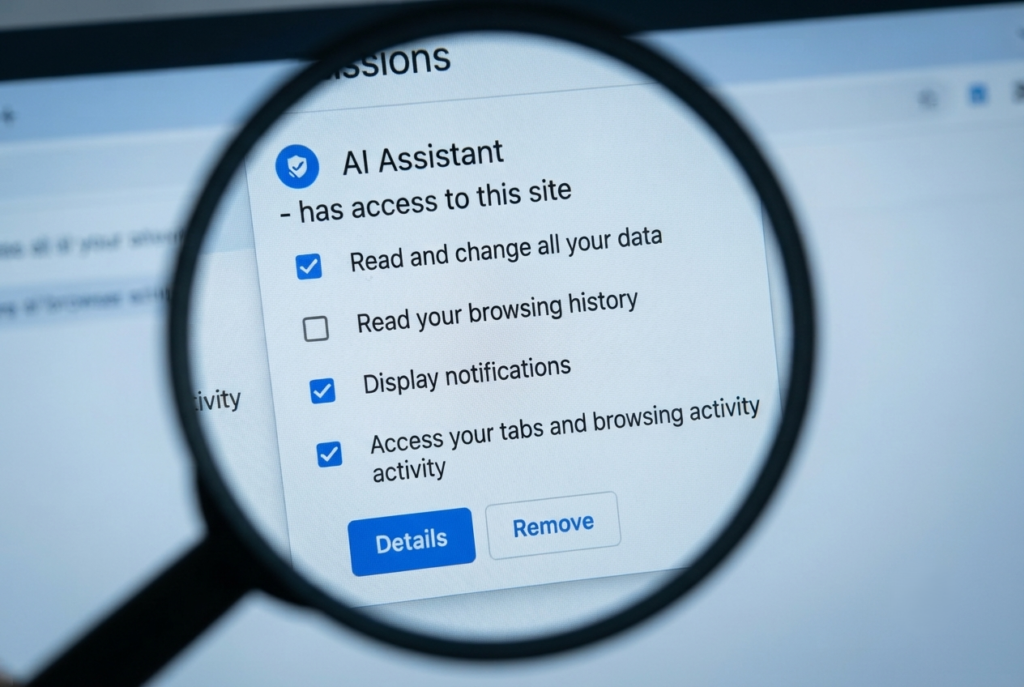
2. AI Browser Extensions with Excessive Permissions
Many productivity extensions request access to:
- All websites
- Browsing activity
- Clipboard data
- Emails
- Open tabs
A 2026 study found that over half of AI Chrome extensions collect user data, while many access personally identifiable information.
According to this AI Tool Privacy Guide 2026, browser permissions deserve as much attention as passwords.
What to Do Instead
Audit every extension monthly.
Remove tools you no longer use.
Avoid extensions that request unnecessary permissions.
Use browser profiles for separation:
- Personal browsing
- Work browsing
- AI experimentation
This separation strategy also helps users avoid AI productivity chaos caused by uncontrolled tool sprawl. This single workflow dramatically improves privacy hygiene.
3. AI Meeting Notetakers Recording Too Much
AI meeting assistants exploded in popularity during 2025–2026.
But legal experts increasingly warn about compliance and consent issues.
Many tools automatically:
- Record calls
- Store transcripts
- Analyze sentiment
- Save action items
- Sync conversations to cloud storage
The problem?
Participants often do not fully understand what gets stored.
Safer Workflow
Use AI notetakers only for:
- Internal productivity calls
- Low-sensitivity meetings
- Educational sessions
Avoid using them for:
- Legal discussions
- HR issues
- Financial negotiations
- Confidential client conversations
Also:
Always notify participants when AI transcription is active.
4. AI Tools Creating Invisible Data Profiles
Many modern AI systems quietly build behavioral profiles over time.
Even when users think they are only asking simple questions, AI tools may track:
- Writing style
- Usage frequency
- Search behavior
- Work patterns
- Communication tone
- Productivity habits
This creates long-term digital profiling risks that most users never consider.
The danger increases when multiple AI tools share analytics ecosystems or third-party tracking systems.
Safer Alternative
Reduce behavioral tracking exposure by:
- Logging out of unused AI platforms
- Avoiding unnecessary account linking
- Clearing stored histories periodically
- Using separate browsers for AI tasks
- Limiting always-on AI assistants
Treat AI systems as data observers, not just productivity tools.
5. Uploading Entire Cloud Drives to AI Systems
Some AI assistants now request broad access to cloud storage platforms like:
- Google Drive
- Dropbox
- OneDrive
- Notion workspaces
While this improves automation convenience, it also dramatically increases privacy exposure.
Users often grant full-drive access without realizing how much confidential information exists inside years of stored files.
One accidental integration can expose:
- Archived contracts
- HR documents
- Tax files
- Client assets
- Personal records
- Internal business strategy files
Safer Alternative
Instead of granting full storage access:
- Share only specific folders
- Use temporary project directories
- Restrict file permissions
- Remove old sensitive files first
- Disconnect unused integrations regularly
The less data accessible to AI systems, the lower the long-term risk surface.
9 Smart AI Privacy Habits for Safer Workflows
Habit 1: Never Paste Raw Sensitive Data
This single habit prevents most AI privacy disasters.
Never upload:
- Full customer lists
- Contracts
- Government IDs
- Passwords
- Banking details
- Medical records
- Internal company secrets
Instead:
- Replace names with placeholders
- Remove identifying numbers
- Use summaries instead of raw files
- Create anonymized examples
Think of AI tools like public conference rooms unless proven otherwise.
Habit 2: Separate Personal and Work AI Accounts
Mixing personal and professional AI usage creates chaos.
Keep separate:
| Personal AI Usage | Work AI Usage |
| Personal planning | Client projects |
| Casual prompts | Business operations |
| Personal writing | Company documents |
| Private experimentation | Professional workflows |
This separation reduces accidental exposure and simplifies audits later.
Habit 3: Review AI Retention Policies
Most people never read AI privacy settings.
You should.
Check whether tools:
- Train on your data
- Store prompts indefinitely
- Share information with third parties
- Retain deleted conversations
- Allow opt-outs
Several enterprise AI tools now provide stronger privacy controls than consumer versions.
Habit 4: Avoid Risky Browser Extensions
Browser extensions are one of the biggest hidden risks in the modern AI ecosystem.
Many request permissions to:
- Read browsing history
- Access tabs
- Capture typed text
- Modify websites
- Monitor activity
Only install extensions you truly need.
Better yet:
- Remove unused extensions monthly
- Check permissions carefully
- Prefer trusted vendors
- Avoid “free” unknown AI tools
The AI Tool Privacy Guide 2026 strongly recommends limiting unnecessary extension access.
Habit 5: Turn Off AI Training Where Possible
Many AI platforms now allow users to disable model training on conversations.
Always check settings like:
- “Improve model using your chats”
- “Training permissions”
- “Data sharing”
- “Conversation history”
Disabling training won’t make you invisible, but it significantly reduces exposure.
Habit 6: Use Privacy Layers and Redaction
Professional users should add a privacy layer before sending data into AI systems.
Examples include:
- Redacting names
- Removing email addresses
- Hiding financial identifiers
- Converting sensitive data into summaries
Simple redaction habits dramatically lower risk.
Habit 7: Audit Connected Apps Monthly
AI tools increasingly connect with:
- Google Drive
- Dropbox
- Notion
- Slack
- Gmail
- CRMs
- Calendars
Over time, forgotten integrations accumulate.
Once a month:
- Review connected apps
- Remove unused permissions
- Disconnect abandoned services
- Revoke suspicious access
This is one of the most overlooked security habits in modern workflows.
Habit 8: Use Local or Secure AI Tools for Confidential Work
Not every task belongs in public AI systems.
For sensitive workflows:
- Use enterprise AI solutions
- Prefer local AI models
- Choose encrypted environments
- Keep confidential operations offline where possible
Privacy-conscious users increasingly adopt self-hosted or controlled AI setups for this reason.
Habit 9: Create an AI Usage Rulebook
Whether you work alone or with a team, define clear rules.
Your AI policy should answer:
- What data can be uploaded?
- Which tools are approved?
- What information is prohibited?
- Who reviews AI outputs?
- How long is data retained?
Simple rules prevent expensive mistakes later.
AI Tool Privacy Guide 2026: The Safe Workflow Framework
Now let’s move from fear to execution.
This framework helps everyday users safely integrate AI into productivity systems.
One major goal of this AI Tool Privacy Guide 2026 is helping users avoid accidental exposure before it happens.
If you are new to workflow systems, start with our beginner AI automation setup guide before building advanced integrations.
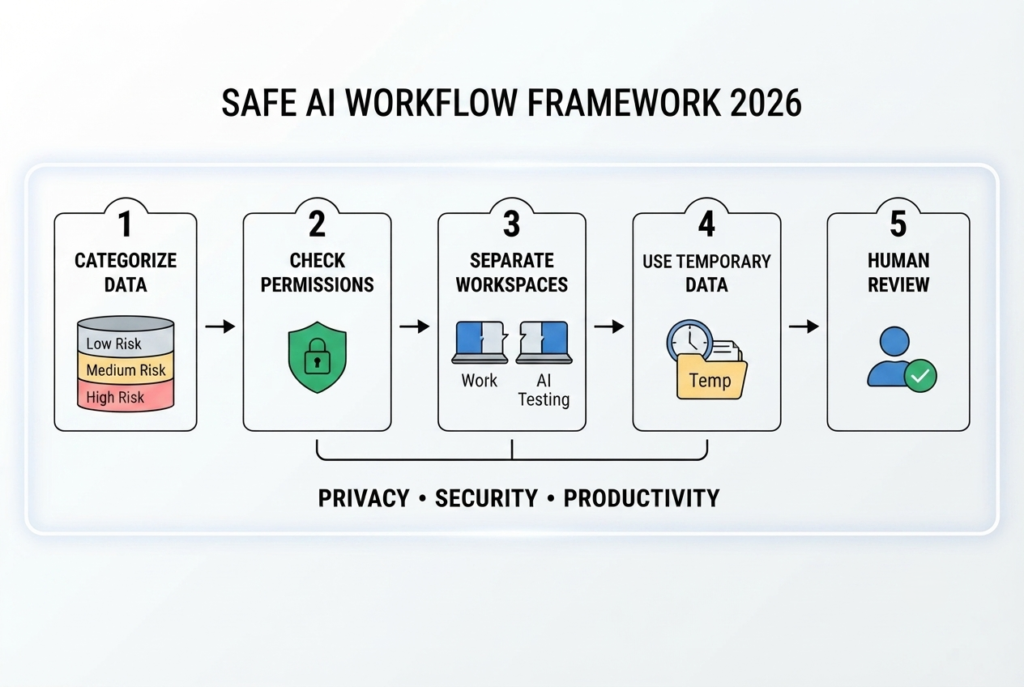
Step 1: Categorize Your Data
Before using any AI tool, separate information into 3 categories.
Low Risk
Safe for most AI tools.
Examples:
- Public blog outlines
- General brainstorming
- Generic productivity planning
- Public research summaries
Medium Risk
Requires caution.
Examples:
- Internal meeting notes
- Client drafts
- Business strategies
- Personal productivity systems
High Risk
Never upload casually.
Examples:
- Passwords
- Financial records
- Medical data
- Legal documents
- Sensitive contracts
- Personal identifiers
This one habit alone prevents most AI privacy mistakes.
| Category | Example | AI Usage |
| Public | Blog outlines | Safe |
| Sensitive | Client drafts | Redact first |
| Confidential | Financial records | Avoid public AI |
This simple classification removes confusion.
Step 2: Create an AI Tool Permission System
Most users install tools impulsively.
That creates chaos.
Instead, use a permission checklist.
Before connecting any AI tool, ask:
Does this tool access:
- My emails?
- My cloud storage?
- My calendar?
- My browser history?
- My documents?
- My microphone?
If the answer is yes, determine whether that access is truly necessary.
Minimal access equals lower risk.
Step 3: Separate Workspaces
One of the smartest practices in this AI Tool Privacy Guide 2026 is separation.
Use different environments for different activities.
Workspace separation is one of the most important principles inside this AI Tool Privacy Guide 2026 framework.
Recommended Setup
Workspace A — Personal
- Personal browsing
- Banking
- Private notes
Workspace B — Work
- Company tasks
- Team communication
- Client projects
Workspace C — AI Testing
- New tools
- Experimental automation
- AI assistants
- Browser extensions
This prevents cross-contamination between sensitive and experimental environments.
Step 4: Use Temporary Data Whenever Possible
Never feed permanent sensitive data into AI systems unless absolutely necessary.
Instead:
- Use excerpts
- Use anonymized examples
- Use summarized datasets
- Use temporary documents
Example:
Instead of uploading a full spreadsheet with employee salaries, upload only anonymous patterns.
Step 5: Build a “Human Review” Rule
AI-generated output should never become automatic truth.
This matters for both privacy and accuracy.
Recent research shows productivity gains can sometimes create overreliance and lower critical thinking.
Always review:
- AI summaries
- AI-generated emails
- AI reports
- AI decisions
- AI automation outputs
Especially before sharing externally.
Real-World Safe AI Workflow Examples
Student Workflow
A student using AI for productivity can safely:
Safe Uses
- Study summaries
- Flashcards
- Essay outlines
- Research organization
Avoid Uploading
- Personal student IDs
- Private academic records
- Financial aid documents
Students should also review how AI note-taking apps store lecture recordings.
A safer workflow is summarizing notes manually before AI analysis.
Freelancer Workflow
Freelancers often use AI heavily for speed but those following the AI Tool Privacy Guide 2026 usually experience fewer client-security issues long term.
Our detailed guide on AI tools for freelancers explains how to balance productivity with client privacy safely.
Smart AI Usage
- Proposal drafting
- Content outlines
- Productivity planning
- Automation workflows
Dangerous Usage
- Uploading full client databases
- Sharing confidential client assets
- Pasting raw contracts
Instead:
Use placeholders and anonymized project descriptions.

Small Business Workflow
Businesses face the biggest risk from shadow AI.
Many employees use unauthorized AI tools silently because official systems are too slow.
Better Approach
Instead of banning AI entirely:
- Approve safe tools
- Create simple AI usage policies
- Train employees on safe prompting
- Define restricted data categories
This creates safer adoption without productivity collapse.
Common AI Privacy Mistakes That Create Serious Problems
Mistake 1: Trusting Every AI Tool Equally
Not all tools follow the same privacy standards.
Some tools:
- Store prompts indefinitely
- Train on user inputs
- Share data with partners
- Retain transcripts
Always check:
- Privacy policies
- Data retention rules
- Enterprise settings
- Opt-out controls
Mistake 2: Connecting Everything at Once
Users often connect:
- Gmail
- Drive
- Slack
- Notion
- Calendar
- CRM
to a new AI assistant immediately.
That creates massive exposure.
Start small.
Grant access gradually.
Mistake 3: Using Free Tools for Sensitive Work
Free tools may still be excellent.
But many monetize through:
- Data usage
- Training improvement
- Analytics
- Advertising ecosystems
Sensitive work deserves stricter controls.
Mistake 4: Ignoring AI Surveillance Risks
Some modern productivity systems monitor:
- Keystrokes
- Activity patterns
- Screenshots
- Behavioral signals
Experts increasingly warn that workplace AI monitoring is expanding rapidly.
Understand what your tools actually collect.
Optimization Tips for Safer AI Productivity Systems
Use Layered AI Instead of One Mega Tool
Do not centralize everything into one AI assistant.
This practical AI productivity framework explains how layered systems reduce both overload and privacy exposure.
Instead:
- Writing AI
- Research AI
- Automation AI
- Notes AI
should remain partially separated.
This limits exposure.
Schedule Monthly AI Audits
Once per month:
Review:
- Installed extensions
- Connected accounts
- AI integrations
- Permissions
- Shared folders
Remove unused tools immediately.
Keep a Manual Backup System
AI systems can fail.
Never rely completely on:
- AI memory
- AI summaries
- AI organization
Maintain manual backups for important workflows.
Use “Least Privilege” Access
Only give AI systems the minimum access required.
This principle is becoming a core recommendation in enterprise AI security discussions.
Best Tools and Settings for Safer AI Use
Here are practical improvements most users can implement quickly.
| Tool Type | Safer Practice |
| AI Chatbots | Disable training history |
| Browser Extensions | Limit permissions |
| Cloud Storage | Review integrations |
| Meeting AI Tools | Control transcript access |
| Password Managers | Never paste credentials into AI |
| Business AI Platforms | Use enterprise privacy settings |
For official privacy guidance, review resources from organizations like the U.S. Government Accountability Office.
The Future of AI Privacy in Productivity Workflows
2026 is becoming the year of AI governance.
Organizations increasingly realize that productivity without privacy eventually creates risk.
Recent reports show regulators and businesses are pushing toward stronger AI governance, monitoring controls, and clearer documentation practices.
At the same time, AI productivity adoption keeps accelerating because the benefits are undeniable.
That means the future is not:
“Use AI” versus “Avoid AI.”
The real future is:
“Use AI intelligently.”
And that begins with workflow design.
FlowSage Pro Recommended Reading
To build smarter and safer AI productivity systems, continue with these guides:
- AI Productivity & Workflow Systems for Everyday Users: The Complete 2026 Guide
- How to Avoid AI Tool Overload in 2026
- Best AI Workflow Systems for Freelancers
- Notion AI Review 2026
- AI Automation Systems for Beginners
- Compare: Zapier vs Make vs n8n for Everyday Users
Suggested internal anchor text opportunities:
- smarter AI workflow systems
- avoid AI productivity chaos
- beginner AI automation setup
- AI tools for freelancers
- practical AI productivity framework
- complete AI workflow guide

Final Thoughts
The goal of this AI Tool Privacy Guide 2026 is not fear.
It is clarity.
AI tools can absolutely improve productivity.
But productivity without boundaries creates hidden costs:
- Data exposure
- Surveillance risks
- Workflow dependency
- Security vulnerabilities
The smartest users in 2026 are not the people using the most AI tools.
They are the people building intentional systems around them.
That means:
- Smarter permissions
- Cleaner workflows
- Safer integrations
- Better data boundaries
- Human oversight
When you combine productivity with privacy awareness, AI becomes far more sustainable long term.
And that is the real competitive advantage in 2026.
Sources
Recent reporting and research referenced throughout this article: Reuters, TechTarget, GAO, Mayer Brown, Littler, Workplace Privacy Report, arXiv studies, Reddit productivity/privacy discussions, and 2026 AI workplace security analyses.
Frequently Asked Questions
Is using AI tools safe in 2026?
AI tools can be safe when used responsibly. The biggest risks come from oversharing sensitive information and ignoring privacy settings.
Do AI tools store my prompts?
Many AI platforms store prompts temporarily or permanently depending on settings and policies. Always review retention settings carefully.
Should businesses allow employees to use AI?
Yes, but businesses should create clear AI usage policies and approved tool lists rather than banning AI entirely.
Are AI browser extensions dangerous?
Some are. Many request excessive permissions and collect user data. Install only trusted extensions and review permissions regularly.
What is shadow AI?
Shadow AI refers to employees using unauthorized AI tools without company approval, often creating privacy and compliance risks.
How can I protect client data while using AI?
Redact identifying information, avoid uploading confidential files, separate workspaces, and use secure enterprise tools whenever possible.
Conclusion
AI isn’t slowing down.
In fact, AI productivity systems are becoming deeply embedded into everyday work, study, automation, communication, and business operations.
That’s why building privacy habits now matters so much.
This AI Tool Privacy Guide 2026 isn’t about fear.
It’s about control.
The people who thrive in the next phase of AI adoption won’t be the ones avoiding technology completely. They’ll be the users who understand how to combine productivity, security, privacy, and smart workflow design together.
Protect your data.
Protect your workflows.
And build AI systems you can trust long term.