
Why Productivity Feels Harder in 2026

Most people assumed AI would magically reduce stress and save massive amounts of time. Instead, many everyday users now feel buried under notifications, disconnected apps, endless tabs, and scattered information. One tool stores your notes. Another handles tasks. A third creates documents. Then AI enters the picture and suddenly you’re juggling prompts, summaries, workflows, and automations too. Productivity starts feeling less like progress and more like digital survival.
That problem is becoming increasingly common. According to Microsoft’s 2026 Work Trend Index, organizations are struggling to redesign workflows around AI even as adoption continues rising rapidly worldwide. At the same time, a recent workplace survey found nearly 70% of office workers believe AI improved productivity, but only a smaller percentage successfully integrated AI into their actual daily workflow. That gap matters. Owning AI tools is not the same as building an efficient system around them.
This is exactly where Notion AI for Everyday Users becomes relevant. Instead of forcing users to manage multiple disconnected systems, Notion combines notes, databases, projects, calendars, documents, collaboration, and AI inside one workspace. Think of it like transforming your chaotic digital desk into a clean command center where information flows naturally. Unlike standalone AI tools, Notion AI for Everyday Users works directly inside an organized productivity ecosystem.
If you already read FlowSage Pro’s guide on AI Productivity & Workflow Systems for Everyday Users: The Complete 2026 Guide, you already understand that productivity today depends less on working harder and more on reducing friction between tools. Notion AI works best when it becomes that central “home base” for your digital life.
The Hidden Cost of Digital Clutter
Digital clutter quietly destroys focus. Every time you switch between apps, your brain burns energy reorienting itself. Researchers increasingly call this “context switching fatigue.” It sounds harmless until you realize most modern knowledge workers spend entire days bouncing between tabs rather than doing meaningful work.
Reddit discussions around productivity tools in 2026 repeatedly mention this same frustration. Users consistently describe Notion as a “single source of truth” because it reduces information scattering. The benefit is psychological as much as practical. For many people, Notion AI for Everyday Users reduces the stress caused by fragmented workflows and disconnected productivity apps. Your brain relaxes when everything has a clear place.
Recent AI productivity research suggests that context switching and fragmented workflows reduce cognitive efficiency significantly.
Why Most AI Tools Create More Confusion
Many AI apps promise productivity but accidentally create extra decision-making. One Reddit user described how AI didn’t reduce work: it simply raised expectations and multiplied choices. That observation feels painfully accurate for many users. Faster drafts lead to more revisions. More generated ideas create more mental overload.
Notion AI succeeds because it focuses less on novelty and more on workflow integration. The AI exists inside your notes, projects, documents, and databases rather than acting like a separate disconnected chatbot.
What Is Notion AI and Why Everyone Is Talking About It
At its core, Notion AI is an intelligent workspace assistant embedded directly inside Notion. It helps summarize notes, organize information, generate writing, automate repetitive tasks, brainstorm ideas, extract action items, and connect knowledge across projects.
What changed in 2026 is that Notion evolved beyond being “just a note-taking app.” According to recent coverage from TechCrunch, Notion introduced AI agents and expanded workflow automation capabilities designed to coordinate tasks across tools and databases. That matters because productivity software is shifting from passive storage toward active collaboration with AI systems.
Advanced users interested in workflow scaling should also explore choosing the right automation tool for connected productivity systems.
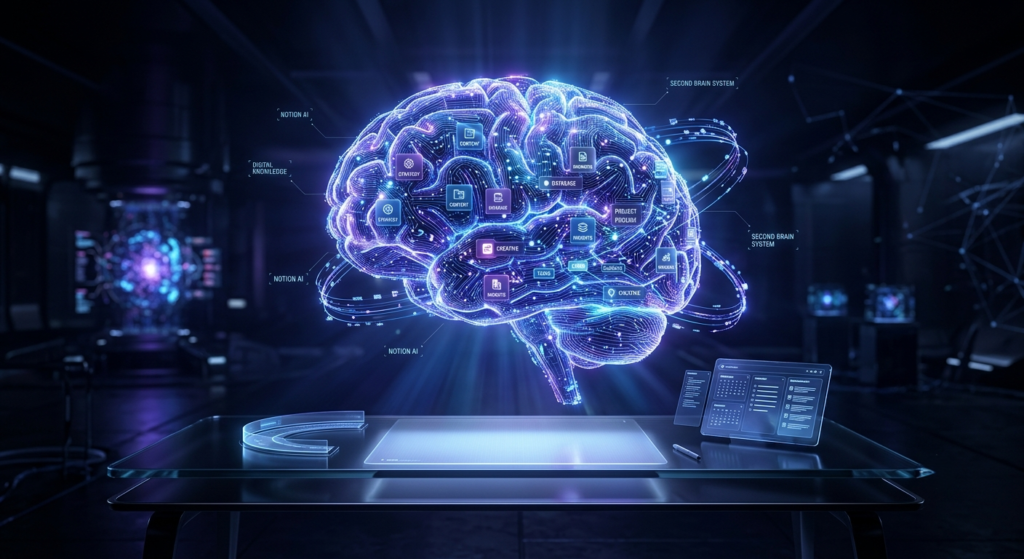
The Evolution of Notion AI in 2026
The newest direction of Notion AI focuses heavily on what experts call “agentic workflows.” Instead of simply answering prompts, the platform increasingly assists with multi-step work processes.
For example, a freelancer can now:
- Capture meeting notes automatically
- Generate client summaries
- Create task lists
- Organize deliverables
- Draft follow-up emails
- Track project progress
All inside one workspace.
This shift mirrors broader workplace AI trends. Microsoft’s research found nearly half of AI-assisted work now involves cognitive tasks like analysis, decision-making, and problem solving. AI is no longer limited to generating text. It is becoming operational infrastructure. This shift is one reason why Notion AI for Everyday Users is gaining traction in modern workflow systems.
How AI Workspaces Replaced Traditional Productivity Apps
Traditional productivity tools behaved like separate drawers. One app handled documents. Another handled notes. Another managed projects. Another tracked calendars.
The rise of modern AI systems has accelerated the shift from isolated productivity tools toward connected work ecosystems.
That distinction changes everything for students, bloggers, freelancers, and solopreneurs because information becomes interconnected. A research note can automatically become a project task. A meeting transcript becomes an action plan. A brainstorm becomes a publish-ready outline.
If you’ve been struggling with tool fatigue, FlowSage Pro’s article on How to Avoid AI Tool Overload in 2026 becomes especially relevant here because the future of productivity is increasingly about consolidation rather than accumulation.
Who Should Use Notion AI for Everyday Users
Students
Students benefit massively from structured AI workspaces because modern education involves overwhelming information intake. Lecture notes, assignments, research papers, deadlines, and revision schedules quickly become chaotic.
Notion AI helps simplify that process by:
- Summarizing long notes
- Creating study guides
- Turning messy notes into structured outlines
- Generating flashcard prompts
- Organizing research material
A student researching climate change, for instance, can instantly summarize journal articles, extract key concepts, and build revision databases without manually rewriting everything.
Freelancers and Solopreneurs
Freelancers constantly switch roles throughout the day. One moment you’re writing content. Next you’re handling invoices. Then client communication. Then project management.
That fragmentation destroys momentum.
Notion AI helps centralize operations into one flexible workspace. Many freelancers now use it as:
- A CRM
- Content planner
- Client dashboard
- Writing assistant
- Meeting organizer
- Proposal manager
The real advantage is continuity. Everything connects together instead of living inside isolated tools.
Small Teams and Content Creators
Small teams often cannot afford enterprise-level productivity systems. They need lightweight workflows that still feel professional and scalable.
Notion AI bridges that gap surprisingly well. Teams can:
- Build SOPs
- Share knowledge bases
- Generate meeting summaries
- Maintain project visibility
- Organize collaborative documents
This flexibility makes Notion AI for Everyday Users highly practical for growing teams with limited resources.
Reddit users discussing Notion workflows repeatedly mention improved organization once teams centralized information. The AI accelerates that process instead of replacing it.

15 Powerful Ways Notion AI Improves Daily Productivity for Everyday Users
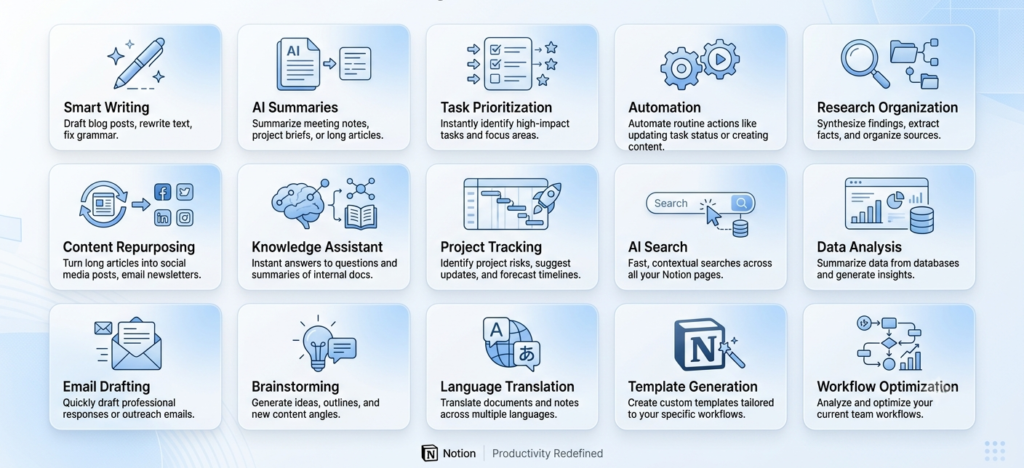
1. Smart Writing Assistance That Saves Hours
Notion AI for Everyday Users helps transform rough notes into structured, readable content instantly. Instead of starting from a blank page, users can generate outlines, drafts, emails, and summaries directly inside their workspace. This is especially useful for students and bloggers who constantly need clean written output. The AI reduces friction in writing, making content creation feel natural instead of forced.
2. Instant Summarization of Long Notes
Long lectures, research papers, or meeting notes can be condensed into clear summaries within seconds. This allows users to extract meaning instead of rereading full documents. It’s particularly powerful for students preparing for exams or professionals revisiting meeting discussions.
3. AI Meeting Notes and Action Extraction
Meetings often generate confusion instead of clarity. Notion AI automatically extracts action points, decisions, and follow-ups. This ensures nothing important gets lost. Teams can immediately turn discussions into structured workflows.
4. Knowledge Organization and Structuring
Notion AI helps organize scattered information into structured systems. Instead of messy folders, users get categorized knowledge hubs. This creates long-term clarity and improves memory recall over time.
5. Workflow Automation Inside Workspaces
Repetitive tasks like status updates, reporting, and task generation can be partially automated. Notion AI reduces manual effort and keeps workflows consistent across projects.
6. AI-Powered Task Creation and Planning
Users can convert ideas into actionable tasks instantly. For example, a brainstorming note can become a full project plan. This helps freelancers and solopreneurs move from thinking to execution faster.
7. Smart Task Prioritization
Notion AI for Everyday Users helps prioritize tasks based on urgency and deadlines. Instead of guessing what to do first, users get a structured daily plan. This reduces decision fatigue and increases execution speed.Instead of reacting emotionally to workload pressure, Notion AI for Everyday Users helps create structured execution systems.
8. Content Repurposing for Multi-Platform Use
Content creators increasingly use Notion AI for Everyday Users to maximize output without increasing burnout. A single piece of content can be transformed into multiple formats. Blog posts can become social media captions, emails, or video scripts. This is extremely useful for creators managing multiple platforms.
9. Personal Knowledge Assistant
Notion AI for everyday users becomes a long-term memory system where users can query past knowledge. It allows semantic recall like “What did I learn about SEO last month?” This builds intellectual continuity.
10. Research Organization for Students and Writers
Research materials can be collected, summarized, and structured in one workspace. Instead of switching between tabs, everything stays connected inside Notion.
11. Faster Content Drafting for Creators
Writers can turn ideas into structured drafts quickly. This improves publishing speed and reduces mental fatigue during writing. Current AI workflow trends show that creators increasingly rely on centralized AI ecosystems for content scaling.
12. SOP and Process Creation for Businesses
Businesses can convert repetitive workflows into standard operating procedures. This improves consistency and reduces onboarding time for new team members.
13. AI Search Across Entire Workspace
Instead of manually searching folders, users can ask natural language questions. Notion AI retrieves relevant information instantly, improving efficiency.
14. Long-Term Project Tracking
Projects can be tracked over weeks or months with AI assistance summarizing progress. This helps maintain clarity in complex workflows.
15. Reduced Context Switching Across Apps
One of the biggest hidden benefits is reduced app switching. Users stay inside one ecosystem instead of jumping between tools, which significantly improves focus and deep work.
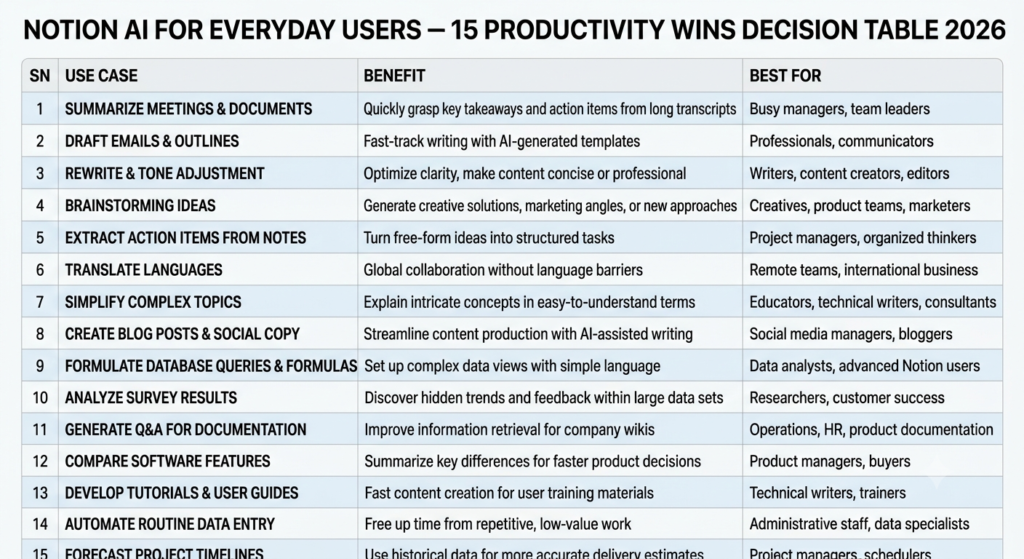
Smart Writing and Summaries
One of the strongest features inside Notion AI for Everyday Users is contextual writing assistance. Unlike standalone AI tools, Notion AI understands surrounding workspace information.
That creates smarter outputs.
A content creator can turn rough brainstorming notes into:
- Article outlines
- Social media posts
- Email drafts
- Video scripts
- SEO summaries
Writers working inside Notion no longer need constant copy-pasting between platforms.
AI Meeting Notes
Meeting documentation remains one of the biggest hidden productivity killers. Users often spend more time rewriting discussions than participating meaningfully.
Recent Notion mobile updates expanded AI meeting notes and summaries significantly. Users can now capture conversations, generate transcripts, and automatically extract action items.
For freelancers and small teams, this feature alone can save hours weekly.
Knowledge Management
Knowledge management sounds corporate and boring until you lose critical information before an important deadline.
Notion AI makes retrieval dramatically easier through AI-powered search and organization. Instead of digging through endless folders, users can simply ask questions naturally.
That feels less like “file management” and more like interacting with a personal knowledge assistant.
Workflow Automation
The biggest productivity gains rarely come from writing faster. They come from eliminating repetitive mental tasks.
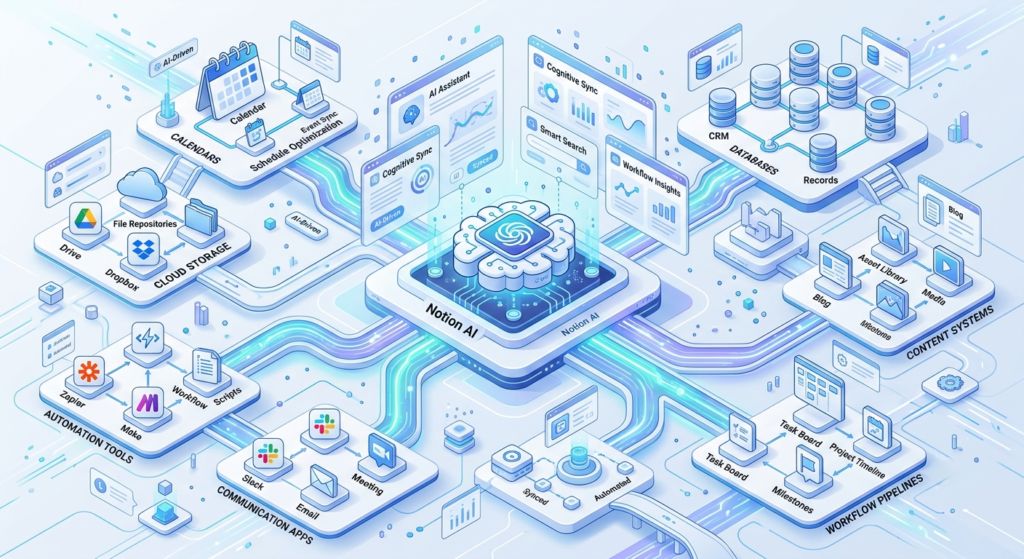
Notion AI workflows now help automate:
- Recurring processes
- Status updates
- Project summaries
- Information routing
- Template generation
That’s where everyday productivity transforms into scalable systems.
If automation interests you, FlowSage Pro’s upcoming comparison guide on Zapier vs Make vs n8n for Everyday Users pairs extremely well with advanced Notion workflows.
Step-by-Step Setup for Beginners
Many users quit Notion because they overcomplicate setup immediately. They build elaborate dashboards before understanding their own workflow. Beginners often discover that Notion AI for Everyday Users feels far less overwhelming once workflows are simplified.
That approach fails.
Building Your First AI Workspace
Start with three simple sections:
- Notes
- Tasks
- Projects
That’s enough initially.
Then gradually connect systems together:
- Link projects to tasks
- Link notes to projects
- Add templates
- Introduce AI summaries
Simplicity creates sustainability.
Creating AI Templates That Save Hours
Templates become powerful when paired with recurring workflows.
Useful beginner templates include:
- Daily planning dashboard
- Meeting note template
- Content production workflow
- Study planner
- Client onboarding checklist
AI becomes dramatically more useful when your structure is already organized.
Common Mistakes Everyday Users Make
The biggest mistake is treating AI like magic instead of infrastructure.
Users often:
- Install too many tools
- Over-automate too early
- Ignore workflow structure
- Depend entirely on AI output
- Create visually impressive but unusable dashboards
Microsoft’s 2026 research repeatedly emphasized that organizational structure matters more than raw AI access alone. That principle applies personally too.
AI amplifies systems. It does not replace them. The goal of Notion AI for Everyday Users is not complexity: it is clarity and reduced mental friction.
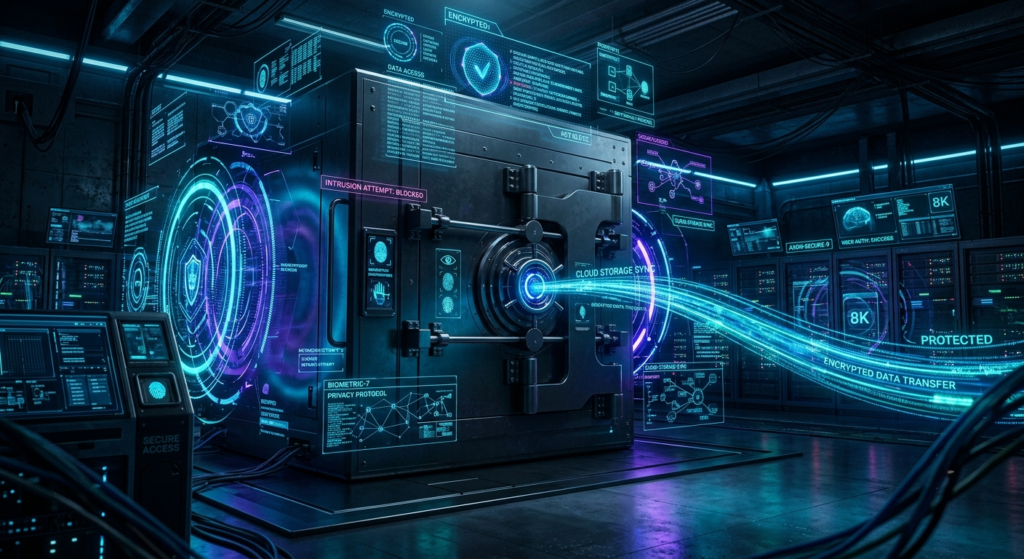
Another common issue involves privacy and information overload. Before centralizing sensitive workflows inside AI systems, users should understand data handling practices carefully. FlowSage Pro’s AI Tool Privacy Guide 2026 explains this area in much greater depth.
Best Notion AI Alternatives in 2026
| Tool | Best Strength | Weakness |
| Notion AI | Flexible all-in-one workflows | Learning curve |
| Microsoft Copilot | Enterprise integration | Less customizable |
| ClickUp AI | Project management | Complex UI |
| Obsidian + AI Plugins | Deep knowledge systems | Technical setup |
| Google Gemini Workspace | Google ecosystem | Limited flexibility |
Different users need different systems.
Choose Notion AI if:
- You want one central productivity hub
- You manage knowledge-heavy work
- You value flexibility
- You enjoy customizable workflows
Choose alternatives if:
- You need strict enterprise compliance
- You prefer extremely simple interfaces
- You only need lightweight task management
Frequently Asked Questions
Is Notion AI worth it for everyday users in 2026?
Yes, especially for users juggling notes, projects, tasks, and content creation in multiple apps. The biggest value comes from consolidating workflows into one intelligent workspace.
Can students use Notion AI effectively?
Absolutely. Students use Notion AI for summarizing lectures, organizing research, managing deadlines, and building revision systems.
Does Notion AI replace ChatGPT?
Not completely. ChatGPT works better for broad conversations and brainstorming, while Notion AI excels inside structured workflows and knowledge management.
Is Notion AI difficult to learn?
The learning curve depends on complexity. Simple note-taking systems are easy to start. Advanced relational databases and automations take more time.
What is the biggest advantage of Notion AI?
Centralization. Instead of scattered productivity systems, users operate from one connected workspace.

Conclusion
Notion AI for Everyday Users is not just another trendy AI feature layered onto an old productivity app. It represents a larger shift in how modern work gets organized. In 2026, productivity is no longer about squeezing more tasks into your day. It is about reducing friction, minimizing digital chaos, and building systems that support focused thinking.
The most successful AI users are not necessarily the people using the most advanced prompts or automations. They are the people creating calmer, clearer workflows where information moves naturally and decisions become easier.
That’s why Notion AI matters. It transforms scattered digital activity into connected momentum, and for the same reason Notion AI for Everyday Users is becoming the foundation of modern productivity systems in 2026.
And in a world overloaded with tools, notifications, and fragmented attention, that kind of clarity becomes a competitive advantage.